

I once lost a whole week chasing a problem I didn’t understand.
Parts were failing QA, but nobody could figure out why. It wasn’t shrinkage. It wasn’t flashing. Then someone said, “It might be jetting.” I didn’t even know what that meant.
If that’s where you are guessing, frustrated, or just curious keep reading. I’ve been in your shoes.
This article is written for you. We’ll cover what jetting is, why it happens, and how it impacts your final parts in plain, simple terms. No jargon. Just real talk.
And by the end, you’ll walk away with a clear picture and the tools to fix or prevent it.
So let’s start!
1. What Is Jetting in Injection Molding?
Something looks off and you don’t know why.
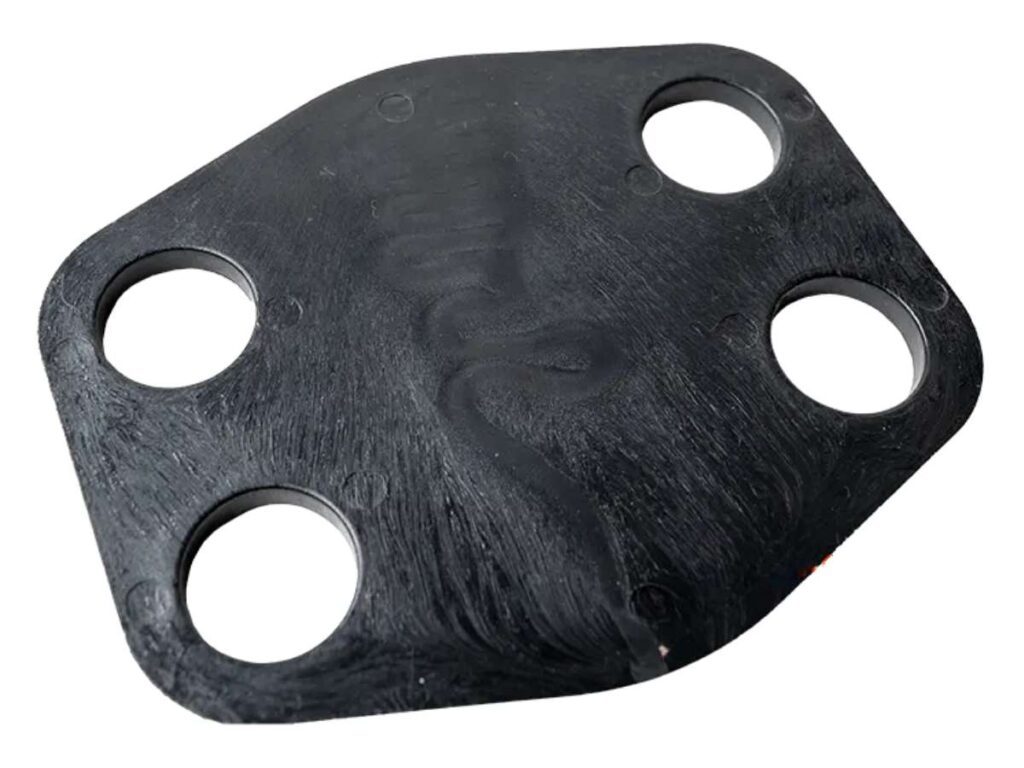
That’s often how people first notice jetting. It’s a flow defect that happens when molten plastic enters the mold cavity too fast. Instead of spreading out in a smooth, controlled way, it shoots forward like a jet of water, forming a narrow stream that hardens too quickly.
That fast-moving stream cools before the rest of the mold fills. The surface solidifies early, which traps the later flow behind it. This creates visible lines and surface flaws that can ruin the part’s appearance.
If you’ve ever seen wavy lines or streaks on an otherwise perfect-looking part, there’s a good chance jetting is the reason.
I’ve been there. One project looked great from a distance, but under the shop lights, we saw strange marks snaking across the surface. That mistake forced a full rework—and a long night.
What It Looks Like
Jetting leaves behind:
- Thin, worm-like flow marks
- Wavy or uneven surface lines
- Rough or inconsistent texture
- Flaws near the gate or where the plastic flow hits a wall and bounces
Sometimes, it just looks like poor finishing. But when you run your fingers across the part or tilt it in the light, the difference becomes clear.
2. What Causes Jetting in Injection Molding?
If you’ve spotted jetting on your parts, the next question is: what’s causing it?
Jetting can come from a few different sources. It usually shows up when the plastic moves too fast or doesn’t flow the right way inside the mold. To fix it, you have to look at how the mold was designed, how the material flows, and how the machine is set up.
Here’s a breakdown to help you troubleshoot step by step.
Poor Gate Design
Sometimes the problem starts right at the gate.
If the gate is too small, it forces the melt through a tight space at high speed. That narrow stream enters the cavity too quickly, which leads to jetting.
Another issue is gate location. If the gate is too close to the parting line, it can shoot plastic directly across the cavity without enough resistance to slow it down. That’s what creates the snake-like marks.
I’ve had jobs where simply moving the gate or using a fan gate instead of a pinpoint made a huge difference.
Improper Flow Path
Plastic doesn’t like to travel long distances without help. If the flow path is too straight and long, the melt may cool in mid-air before it touches a mold wall. Those early cooling leaves visible marks.
Sharp corners or very thin walls also interrupt the flow. They make the plastic change direction too fast, which adds stress and forms surface lines.
Have you checked the flow length in your design? That might be where the issue starts.
Injection Speed or Pressure Too High
High speed sounds good—until it isn’t.
If the plastic enters the mold too fast, it doesn’t have time to fan out. Instead, it jets forward like a stream, cooling in a tight line. This happens a lot with low-viscosity materials that flow quickly by nature.
Try lowering your injection speed or ramping it gradually. That’s solved the issue more than once for me.
Low Melt Temperature
When the melt temperature is too low, the plastic cools before it should. That forms a semi-solid skin on the surface while the inside is still flowing.
The result? Jetting.
Warming the melt just slightly may help it stay fluid long enough to form a smoother part. Don’t overdo it—just enough to keep the flow moving evenly.
Material Choice and Fill Behavior
Some plastics are more likely to jet than others.
Resins like polypropylene (PP) or polyamide (PA) tend to show jetting when injected fast. They cool quickly and don’t always spread well without careful control.
If you’re using one of these materials, try running a flow simulation. That can show you potential jetting spots before you build the mold.
Every part is different. But if you’re seeing surface streaks or snake-like lines, these are the first places to check.
3. How to Spot Jetting Early in Production
Jetting is tricky. It doesn’t always jump out right away. You might hold a fresh part in your hand, glance at the surface, and think it looks fine. But then you turn it slightly under the light—and there it is. A streak. A ripple. Something that shouldn’t be there.
Catching jetting early can save you time, money, and frustration.
Here’s how to spot it before a bad batch gets too far.
Visual Inspection Tips
Start near the gate. That’s usually where jetting begins.
Look closely at the area where the molten plastic enters the part. Jetting often appears as:
- Thin, snake-like lines
- Surface ripples or waves
- Subtle texture changes that don’t match the rest of the part
Try this: hold the part under bright, angled light. Turn it slowly. Jetting becomes more visible when shadows hit those raised or uneven areas. I’ve missed flaws in normal lighting, then spotted them immediately just by using a flashlight.
Trust your hands, too. Run your fingers over the surface. Jetting can feel rough or different from the rest of the finish.
Mold Trial and First Article Checks
The first few parts from a mold tell you a lot.
During mold trials, ask the supplier to share high-quality photos of each cavity section—especially near gates or narrow flow areas. Don’t just rely on reports. A single picture can reveal something a spec sheet misses.
Also, document any surface marks during first article inspection. Save examples of both clean and flawed parts. That way, you’ll have a baseline to compare future runs.
And if you’re managing production from a distance? Be clear with your supplier. Ask them to flag and photograph anything that looks off in the early samples.
Want better outcomes from your molds? Spotting jetting early is one of the best habits you can build.
4. Common Parts and Projects Where Jetting Happens
Some parts are just more likely to show jetting than others. The shape, thickness, and flow path all play a role. Even if you’ve done everything right, certain designs make jetting harder to avoid. I’ve learned this through trial and error—especially with early prototypes and tight deadlines.
So where does jetting show up most? Let’s break it down.
Parts with Long Thin Walls
If your part has long, narrow sections, you’re working with what’s called a high aspect ratio. That just means the length is much greater than the thickness. These kinds of parts don’t let plastic flow easily. Instead, the melt moves fast through the narrow space and cools before spreading out.
You might run into jetting with:
- Remote control shells
- Plastic housings
- Electronic enclosures
- Battery compartments
I once worked on a slim wall panel that kept coming back with streaks, no matter how we adjusted the speed. It wasn’t until we changed the gate location that the problem improved.
Parts with Sharp Corners or Ribs
Jetting loves to show up around sharp features.
Corners force the flow to change direction fast. Ribs—those thin vertical walls added for strength can also interrupt the melt and cause cold spots.
Parts at risk include:
- Automotive interior panels
- Laptop casings
- Small appliance parts
If you’re designing for strength, ribs are helpful. But if they’re placed in the wrong spot, they can create trouble for flow.
Personal Projects Using Desktop Injection Machines
Jetting doesn’t just happen in factories.
If you’re working with desktop machines or 3D printed molds, you’re more likely to see flow issues. Most of these setups don’t have advanced control systems. Injection speed and pressure are harder to fine-tune.
DIY projects like:
- Small-batch molded parts
- Maker-style prototypes
- Repair components
These are great for learning, but they often come with more jetting risk. I once made a part using a hobby machine and noticed jetting right away—but the lesson stuck with me.
Working on one of these part types? Keep an eye out. Knowing where jetting tends to happen gives you a head start in fixing it.
5. How to Prevent Jetting in Injection Molding
Once you’ve seen jetting on your part, the next step is clear: stop it from happening again.
Prevention isn’t about luck. It’s about making the right adjustments—whether that’s on the machine, in the mold, or in your material choice. You don’t always need a full redesign. Sometimes, small changes are enough to get the results you want.
Let’s walk through the options.
Process Adjustments
Start with how the machine is running.
If jetting shows up during production, try these process changes:
- Slow down the injection speed: Begin the filling at a slower pace. Once the plastic starts to flow and fills key areas, you can speed it up. That gives the melt time to spread instead of shoot.
- Raise the melt temperature: A hotter melt flows better and cools more slowly. That helps prevent early skin formation and flow marks.
- Adjust hold and packing pressure: These stages push more material into the mold after the cavity fills. Done right, they smooth out any early imperfections.
Have you ever fixed jetting just by tweaking your speed or temp? I’ve done that more than once—and it saved a lot of trouble.
Mold Design Fixes
If process tweaks don’t help, take a closer look at the mold.
- Redesign the gate: A larger gate or a fan or film gate lets the melt spread out early instead of jetting through a small hole.
- Change the gate location: Point the plastic toward a wall or core feature. That slows the flow and helps it fill more evenly.
- Run a flow simulation: Programs like MoldFlow can predict jetting before you cut steel. I’ve seen a simulation save a project that was headed for trouble.
If you’re reworking a mold or need fresh eyes on your gate design, it helps to partner with someone experienced. MachMaster has helped over 500 companies produce high-precision parts with smooth flow and stable outcomes especially for complex CNC and injection molding projects.
Material Considerations
Your choice of plastic makes a big difference.
- Pick materials with better flow behavior, especially for thin-walled parts.
- Additives or blends can help the plastic flow longer before it begins to cool.
I once switched to a slightly different polypropylene blend and watched the jetting disappear completely. Sometimes the fix is that simple.
Preventing jetting takes some testing but once you’ve figured out what works, your parts come out smoother, cleaner, and more reliable.
6. How to Troubleshoot Jetting During Production
Jetting might not show up during design—but it sure can surprise you once the machine starts running.
I remember standing next to the press, watching what I thought would be a clean cycle. But when the part dropped and I picked it up, those same wavy lines stared back at me. That’s when I realized: troubleshooting on the floor is different from planning on paper.
Here’s how to start.
Check These First
Before jumping into major changes, look at the basics:
- Gate type and position: Is the gate too small? Is melt hitting a wall or flowing freely?
- Initial injection speed: A fast start might be too aggressive. Try slowing the first phase.
- Melt temp vs mold temp: If the melt is too cool or the mold is too cold, flow issues can show up fast.
- Resin condition and drying: Wet or improperly stored resin can change how it behaves under pressure.
Have you checked these on your last run?
Sometimes, all it takes is a small tweak in timing or temperature to change the outcome.
Use Short-Shot Testing
This method has saved me more than once.
Short-shot testing means you stop the injection before the mold is fully filled. Doing this helps you see how the flow behaves inside the cavity before jetting ruins the entire part.
You can:
- Observe where the flow starts to ripple
- Pinpoint if the gate location is a problem
- Identify cold spots or sharp transitions
It’s like a sneak peek at what’s going wrong.
Document & Iterate
Every change matters.
- Keep a log of each adjustment: speed, temp, pressure, gate angle.
- Take photos of the defects before and after each step.
- Compare your notes to spot patterns or repeating issues.
I’ve fixed more problems by keeping a simple notebook than by guessing. You don’t need fancy software just a way to track what works.
If you’re stuck repeating the same test without results, it may be time to bring in a second opinion.
MachMaster provides full-process support, from material selection to optimized mold trials, all under ISO 9001-certified systems.
Jetting doesn’t always have a one-size-fits-all fix. But with a steady process, a sharp eye, and clear notes, you’ll figure it out and save your parts in the process.
7. Practical Tips to Avoid Jetting in Injection Molding
Once you understand jetting, the next step is building habits that help you avoid it. I’ve picked up a few tricks over the years some learned the hard way, others shared by toolmakers who’d seen it all.
Here’s a simple breakdown to guide you through design, mold trials, and full-scale production.
General Design & Setup Tips
Before the mold ever closes, you can reduce your chances of jetting just by tweaking the setup:
- Start with slower injection speeds during the first part of the fill
- Use fan or tab gates instead of pinpoint gates if you’re already seeing streaks
- Place gates in thicker, hidden parts of the component whenever possible
- Avoid long, thin flow paths with no resistance. Use ribs or flow deflectors to guide the melt
- Preheat the mold to help the plastic stay molten longer and spread more smoothly
These tips might sound basic, but skipping just one can lead to surface flaws that take hours to fix later.
During Mold Trials or Prototyping
The first few shots can tell you a lot.
- Run short-shot tests to stop the fill halfway and study how the melt behaves
- Use flow simulation tools like Moldflow or Moldex3D before finalizing your design
- Record videos or photos during early mold tests, so you can review where turbulence starts
I once caught a jetting issue just by watching a slow-motion video of the fill. Without that footage, I would’ve missed the early ripple forming near the gate.
For Ongoing Production
Jetting isn’t just a one-time issue it can sneak back if something shifts in your process.
- Monitor your injection speed and melt temperature from batch to batch
- Add “jetting check” to your QC checklist, especially if you’re molding glossy or cosmetic parts
These steps may sound simple, but they can make a big difference in how your parts look and perform.
Thinking about turning this into a printable checklist? That’s a great idea your engineers and QA team will thank you. A clear, visual guide helps everyone stay on the same page.
Conclusion
That day I stood beside the machine, staring at a streaked part, I had no clue what went wrong.
Now you do.
You’ve learned what jetting is, what causes it, how to catch it early, and how to prevent it.
You know where to look and what to tweak—before those streaks ruin your parts or slow your project.
So here’s the real question: What will you change next time you run a mold?
Your parts deserve better. Start using what you’ve learned today.
And if you’re stuck or need help, contact us—we’re here to talk it through.
Explore More of Our Resources
Want to learn more? Here are some articles filled with valuable tips and information to guide you further:
Still haven’t found what you’re looking for? Don’t hesitate to contact us. We’re available around the clock to assist you.