
I spend most of my day running machines, answering supplier calls, and writing quotes. In between, I’m replying to emails and logging orders. My hands take a beating, and I need tools that don’t slow me down.
That’s what got me looking into smaller keyboards. My desk is crowded with tools, samples, and parts, so saving space matters.
I’m not a keyboard expert. But I buy gear that works and lasts. In our business, I’ve learned to spot strong materials, solid design, and good value.
This review covers what the 40% Alice Keyboard Kit feels like, how it’s built, and how it holds up in daily use. You’ll get a clear look at comfort, parts, and the building process.
If you’re trying to decide whether this kit fits your work, your product line, or your team’s desk setup, this review will help you find out.
Let’s get started!
Quick Comparison Chart
The table below gives you a clear view of how the 40% Alice Keyboard Kit performs across key categories, from build and layout to real-world use. It helps you assess the keyboard’s strengths, limits, and how well it supports everyday work.
| Category | Evaluation |
| Specs | Compact 40% Alice layout with gasket mount. CNC aluminum case. Hot-swappable PCB. Supports screw-in stabilizers. Wired USB-C connection. VIA/QMK compatible. |
| Unboxing Experience | Clean and protective packaging. Each part is secure with no extra waste. No flashy presentation, functional and production-ready. |
| Assembly | Straightforward build. Pre-cut gaskets and screw holes aligned perfectly. Screw-in stabs installed cleanly. Hot-swap PCB sped up switch installation. |
| Typing Experience | Stable and quiet with linear switches and foam. Low strain on wrists due to angled layout. Needs a short adjustment period for layers and missing keys. |
| Design & Aesthetic | Minimal and balanced. No branding, fits well in clean or industrial setups. Compact footprint works well in tight spaces. |
| Firmware Customization | Supports QMK and VIA. Easy remapping, macros, and multiple layers. Visual layout editor via VIA saves setup time. Ready for advanced workflows. |
| Real-World Use | Performed well in daily tasks. Helped reduce strain, stayed quiet, saved desk space. No loosening or shift after extended use. |
This side-by-side view helps you decide if the 40% Alice Keyboard kit meets your goals, whether you’re sourcing for teams, building for clients, or refining your own setup.
1. 40% Alice Keyboard Specs
Let’s talk specs.
This is where most decisions start. Whether you’re sourcing for your team or testing a layout for a new product, you need the details first.
So here’s what you’re working with.
- Layout: 40% Alice-style layout. That means fewer keys, no number row, and a split key cluster that angles your hands inward. It’s compact, and yes, there’s a learning curve. But if comfort matters in long sessions, the layout pays off.
- Form Factor: Gasket-mounted. You get a bit of flex when typing, which softens the feel. This matters if your staff or clients will be using it for hours each day.
- Case Material: CNC-machined aluminum. It’s heavy, sturdy, and stays in place. I’ve worked with cheaper builds that rattle or bend under pressure, this one doesn’t.
- Plate Options: Usually comes with an aluminum or polycarbonate plate. Aluminum feels stiffer. Polycarbonate has more give. I went with aluminum for a firm, stable press, but if you’re testing for softer feedback, poly might suit your needs.
- PCB (Printed Circuit Board): Hot-swappable with per-key RGB. That means no soldering needed. You can switch out key switches as often as you like, without tools. This cuts down build time, especially if you’re managing more than one unit.
- Connectivity: USB-C, wired. No wireless. If you’re outfitting a workspace or factory, this is more reliable anyway.
- Stabilizers Supported: Screw-in. They stay firm, reduce rattle, and don’t shift over time. For larger keys like the spacebar, that makes a difference.
- Firmware: QMK and VIA compatible. These let you remap keys, create macros, or set up multiple layers for different workflows. I’ll break this down later, but it’s good to know up front.
When I first looked into this board, I wasn’t just comparing price. I needed something that could take daily wear, fit in tight desk spaces, and offer a better typing posture for me and the crew.
If that sounds familiar, this spec list covers the boxes that matter most.
You don’t need all the bells and lights. You need parts that last, a layout that helps, not hinders, and something that fits the way you and your team work.
2. Unboxing & First Impressions
Before anything gets plugged in or built, the first moment that counts is when the box hits your desk.
Whether you’re reviewing a sample for sourcing or setting up a small production run, how a product arrives says a lot. It gives you an early look at how the brand treats quality, protection, and presentation.
Here’s what I saw when I opened the Wellenphase Keyboard kit.
Simple, Protective Packaging
The kit arrived in a clean, well-packed box.
Nothing flashy. No bright logos or layered foam for show. Just a tight layout with each part wrapped and separated so nothing got scratched or bent in transit.
That already told me something.
This wasn’t made to impress on arrival. It was packed to protect. If you’re shipping in bulk or stocking for builds, that matters more than aesthetics.
What’s Inside the Box
Here’s what came in the kit:
- The aluminum top and bottom case
- A plate (mine was aluminum)
- The PCB, in anti-static wrap
- Screws and rubber feet
- A foam layer (for sound dampening)
- A simple build guide
There’s no extra packaging waste. And no cheap parts tossed in to fill space. Every item had its place, and everything arrived in one piece. No scratches, no dents, no loose screws rattling around.
First Impressions of the Build
The first thing I noticed was the weight.
Once I picked up the case, I knew this wasn’t some lightweight build. The aluminum felt dense and solid. You’re not getting something that shifts around or flexes while typing.
The finish was smooth, with no sharp edges. Even the screw holes were clean, something you notice fast if you’ve dealt with poor machining before.
Visual Style and Fit
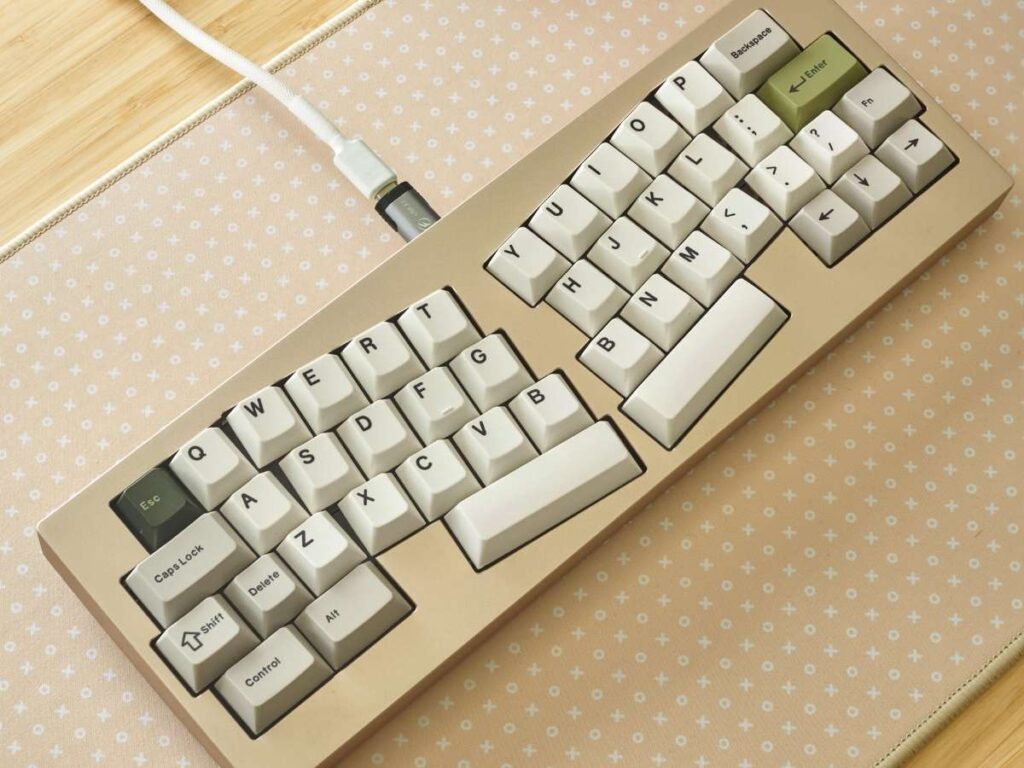
Visually, it’s minimal. No logo, no branding, no distractions. That’s a plus if you’re thinking about white-labeling or adding your own branding later.
For my shop setup, the compact footprint was an immediate win. It fits beside tools, sketches, and product samples without crowding the space.
3. Assembly Experience
Before you see results, you’ve got to build it.
Whether you’re putting together a sample for internal review or prepping for small-batch production, the assembly process needs to be smooth and clear. That’s what I looked for here.
And overall, it delivered.
Getting Started
The parts came organized and ready to go. The included build guide was short, but it hit the key steps. No wasted time flipping through fluff. Just simple diagrams, part labels, and basic instructions.
I had my tools ready, screwdriver, key switch puller, stabilizer lube, and switch lube. If you’ve built before, you won’t hit any surprises. If you’re new, you’ll still manage fine with a bit of patience.
Mounting the Plate and PCB
The gasket mount design was straightforward. The gaskets were pre-cut and easy to line up. Once in place, the plate and PCB slotted in with little effort.
Everything fit tight. No flex, no gaps.
For your team, this matters if you’re trying to keep builds consistent across multiple units. You don’t want one board feeling different from another.
Stabilizers
This kit supports screw-in stabilizers.
I used Durock stabs and pre-lubed them. They installed cleanly, no clipping or odd alignment. The keys that use them, like spacebar and enter, felt firm and quiet after install. No rattling, no wobble.
That makes a difference for buyers who expect a refined feel out of the box.
Switch Installation
The version I used had a hot-swappable PCB.
That saved time. No soldering. Just press the switches into place. I used linear switches (Gateron Oil Kings), and they all fit snug. No loose pins. No bent contacts.
If you’re building in quantity or testing different switch types for feedback, this saves hours.
Final Assembly
Closing the case was simple. The screw holes lined up without struggle, and all the threads were clean. I’ve dealt with misaligned screw posts before, it’s a headache you don’t want. That wasn’t the case here.
Rubber feet went on easily, and once everything was sealed up, the board felt solid. No creaks. No shifting.
4. Typing Experience
Once the build was done, I gave it a full week on my main desk.
Emails. Invoices. Product notes. Supplier follow-ups. The works.
You learn a lot from typing on something all day, not just how it feels, but how it holds up over time.
Layout Feel
The 40% Alice layout takes adjustment. You don’t have a number row. Navigation keys like arrows, home, or delete sit on a different layer. If your workflow depends on fast access to those, expect a few slowdowns at first.
But once your fingers adjust to the layout, it gets quicker. The split angle lines up with how your hands naturally rest. You’re not reaching or twisting like on flat boards.
For me, that helped reduce wrist tightness by the end of the day. I wasn’t stretching or compensating for poor angles.
Sound and Feedback
This build was quiet.
I used linear switches with foam installed between the plate and PCB. The result was a soft thock, no pinging, no hollow noise.
If you’re outfitting an open office or shared space, this sound profile won’t distract anyone nearby.
The feel was stable. Each key press landed cleanly, without wobble. The gasket mount helped cushion the bottom-out slightly, which made longer sessions more comfortable.
Key Travel and Consistency
There were no dead zones or pressure points. Every key registered as expected. No bouncing or chatter.
If you’re thinking about buying this for others, especially employees who type a lot, you’ll want that kind of consistency. You don’t want missed presses or keys that feel uneven.
It’s the kind of board you can forget about while using it. And that’s a good thing.
Muscle Memory and Learning Curve
You’ll need to learn layers. That’s non-negotiable with a 40% layout.
It took me about two days to get used to using a function key for numbers and arrows. But once the layout settled into muscle memory, I didn’t think twice.
If you’re introducing this to staff or clients, consider giving a short layout guide. It saves time and questions on day one.
5. Design & Aesthetic Appeal
Form doesn’t matter if function fails. But when both work together, that’s when a product stands out.
That’s what I looked for with the 40% Alice Keyboard kit, and it delivered the kind of design that fits real workspaces without trying too hard.
Clean and Focused
The first thing you’ll notice is the simplicity.
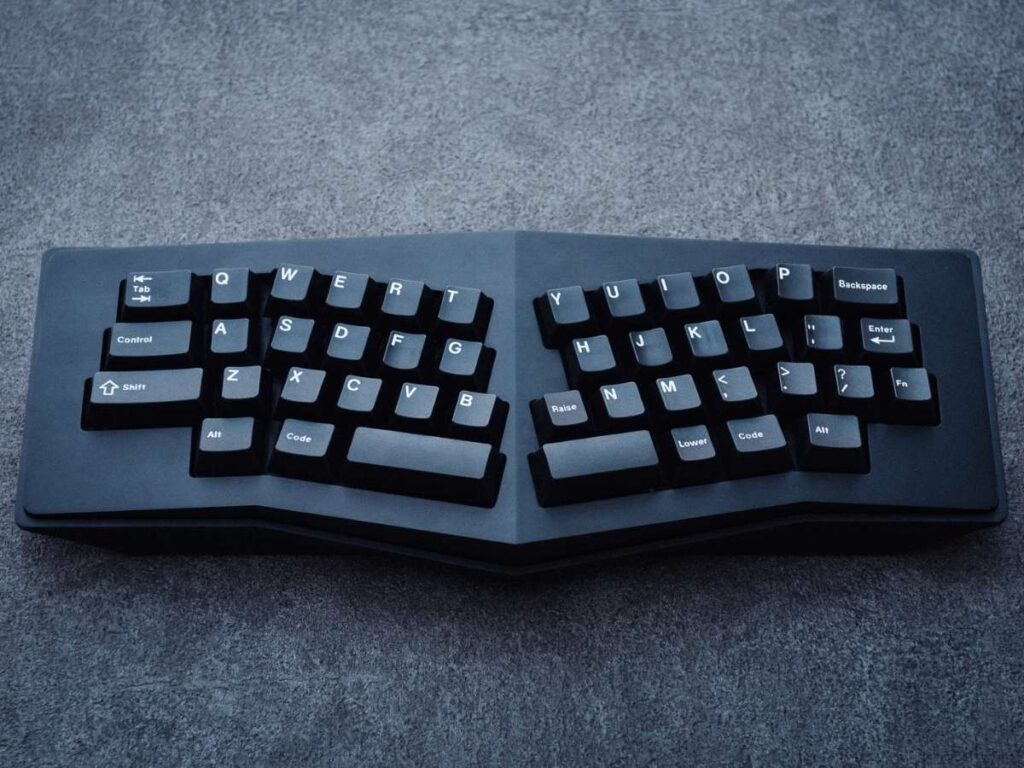
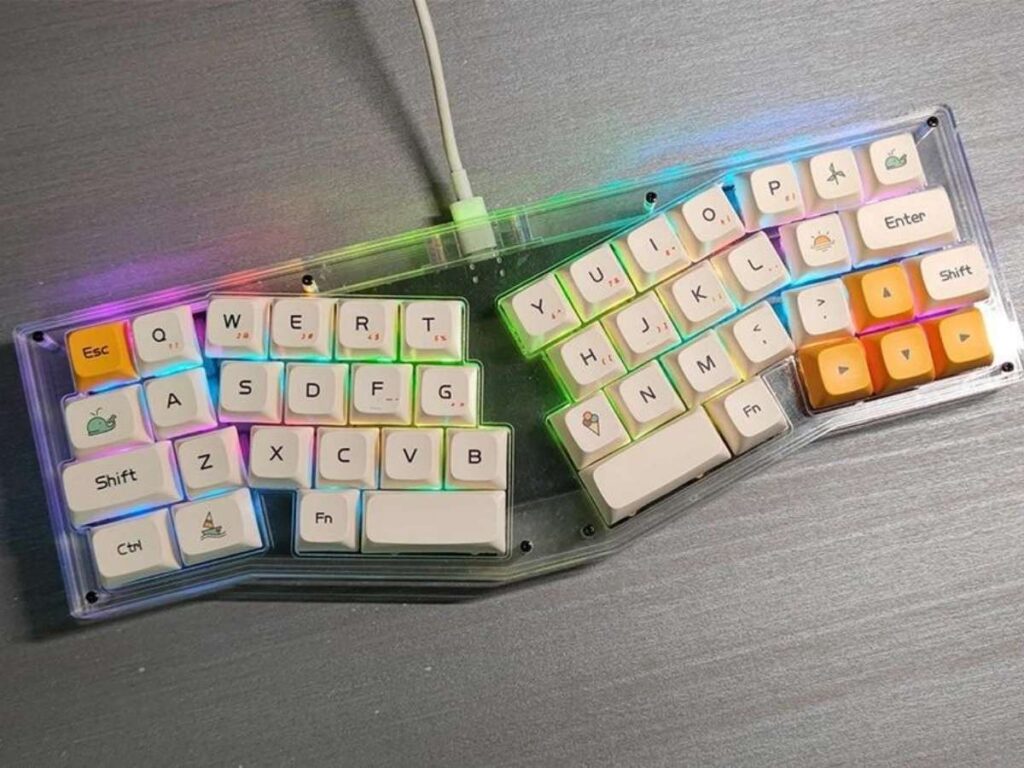
No branding. No extras. Just clean edges, smooth finishes, and a low, balanced profile. The aluminum case looks sharp without drawing attention. That makes it easy to drop into any setup, office, lab, or design bench, without clashing.
There’s enough polish to look finished, but not so much that it feels fragile or showy.
Layout That Looks Good and Feels Better
The Alice-style layout has a natural curve that isn’t just about comfort. It also looks balanced on the desk.
Everything is spaced with purpose. There’s symmetry, but no wasted space. If your work involves product design or branding, this gives you a strong base to build on.
You could customize the look with keycaps or case colors and still keep it grounded and practical.
Fit for Workspaces
The compact footprint is a plus in small work zones. I run a fabrication shop, and my desk is packed with parts, samples, and tools. This board doesn’t eat up space or get in the way.
If you’re considering it for your team or testing it as part of a broader product line, that kind of footprint matters. It leaves room for the rest of your workflow, without sacrificing function.
6. Firmware & Customization
A keyboard this compact needs flexibility.
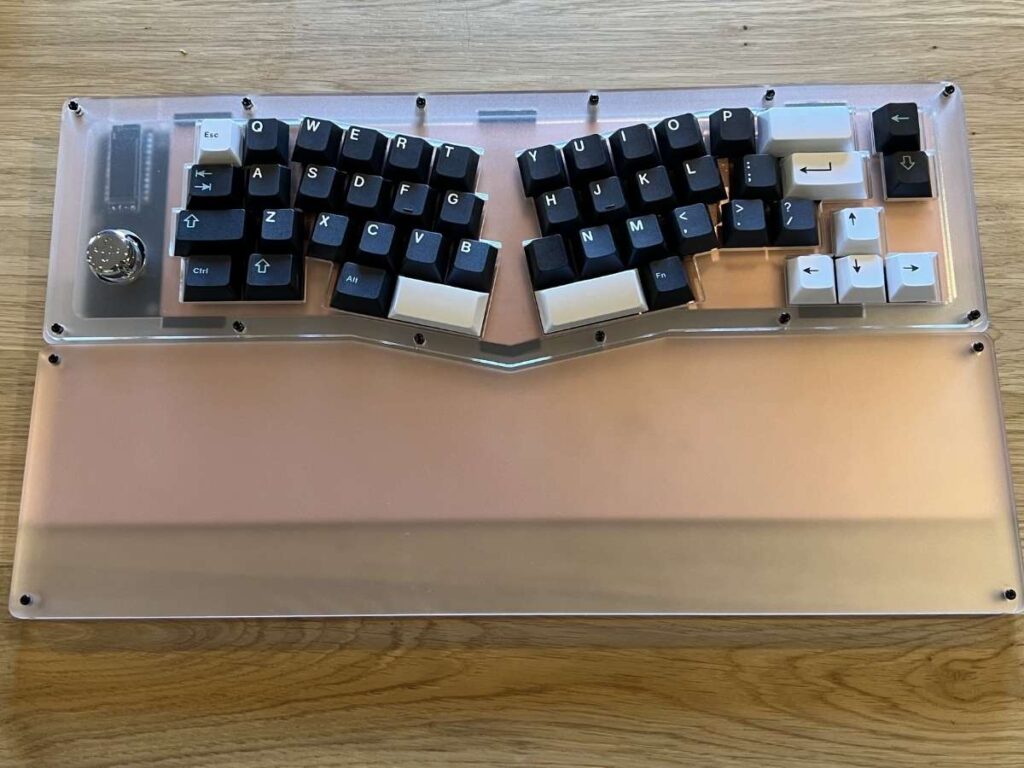
With fewer keys, you have to do more with less. That’s where firmware and key remapping come in. And the 40% Alice Keyboard kit gives you full control without making it complicated.
QMK and VIA Support
The PCB works with QMK and VIA.
If you’ve used custom keyboards before, you probably know these. But if you haven’t, here’s the short version:
- QMK is open-source firmware. It lets you remap any key, build layers, and create macros.
- VIA is a visual tool that runs in your browser or app. It connects to your keyboard and shows a live layout, so you can change keys on the spot, no coding needed.
Both work well with the 40% Alice Keyboard kit. I used VIA for setup and had it run for minutes.
Layers for More Control
With just 40% of the usual keys, layers aren’t optional, they’re essential.
I set mine up so one layer handles numbers and function keys. Another covers arrows, delete, and page up/down. Switching between them felt fast once I got used to holding the function key.
You can build as many layers as you want. If you’re handing this off to a team or client, you can pre-load a layout that fits their work.
Macros and Shortcuts
You can create macros for common actions, like inserting a phrase, running a command, or switching apps. If your team uses software that depends on shortcuts, this can save time.
One of my setups triggers order entry fields we use every day. I mapped it to a single key, and it’s already cut a few seconds off each job.
Small gains, but they add up.
Backlighting and Indicators
The PCB supports per-key RGB, if you care about lighting. I kept mine off, but the option is there.
More importantly, you can assign indicator lights to tell you which layer you’re on. That’s helpful when switching between work modes.
Easy Setup, Strong Control
What I liked most was how little effort it took to get things working.
You don’t need to flash firmware manually or write code. VIA handled 95% of what I needed. QMK gives you more depth if you want to take it further.
If you’re buying this for others or setting it up at scale, that kind of control, with minimal friction, is hard to beat.
7. Real-World Usage Test
Specs and features are one thing. But how a keyboard performs in daily work is what really counts.
So I used the 40% Alice Keyboard kit in my regular setup, no special treatment, no shortcuts. Just real tasks in a real workspace.
Daily Workflow
In a typical week, I move between quoting, scheduling, part tracking, and a good amount of documentation. That means typing for long hours, often while jumping between spreadsheets, email, and supplier portals.
The 40% Alice Keyboard handled that without a problem.
After the adjustment period, I was moving through my tasks with less hand fatigue. The angled layout kept my wrists more relaxed. I didn’t feel that usual tightness at the end of the day.
Speed and Accuracy
Once I got used to the layer system, my typing speed went back to normal. Then it improved.
The lack of travel to reach keys, especially on a tight desk, made switching between apps and commands feel faster. The key spacing helped reduce missed presses, even when I was moving fast.
That might not matter much for light users. But if your team types all day, this layout could help with both pace and accuracy.
Workspace Fit
Space is tight on my bench. I’ve got measurement tools, parts bins, and documents spread out. A full-size keyboard just gets in the way.
The 40% Alice Keyboard gave me back space I didn’t realize I needed. That makes a difference when you’re managing multiple tools and need room to work.
Noise and Distraction
Noise matters in shared spaces. With linear switches and foam installed, the board stayed quiet, even under heavy typing.
No sharp clicks. No metallic pinging. Just a soft, dampened sound. That makes it a strong option for open offices or team zones.
Conclusion
I started with sore wrists, a cluttered desk, and a need for better tools. The 40% Alice Keyboard kit didn’t just fit, it improved how I work.
This board checks the boxes: strong build, smart layout, quiet press, and clean design. It fits into busy spaces and heavy workflows without slowing you down.
If you’re thinking about improving your setup or building a better product, this is a solid step forward.
Reach out if you have questions or want help getting started. Let’s find what works for you. Contact MachMaster today.