
I used to think laser cutting was just for decorative panels.
You send a file to the machine, it cuts a cool pattern, and that’s it.
That’s what I believed—until I visited a small workshop where they were building an entire product line using flat sheets alone.
No molds. No fancy equipment. Just clever design and clean cuts.
Brackets, display frames, packaging inserts—everything came out of a laser cutter.
Someone looked at me and said,
“If we can sketch it flat, we can make it work.”
That moment changed how I saw sheet design.
Laser cutting isn’t just about looks. It’s about solving problems, reducing steps, and turning a flat piece of material into something smart and usable.
If you’ve been searching for design ideas that are both visual and functional, this guide will help.
Over the years, I’ve tested different layouts, materials, and file types to see what works—not just in theory, but on real machines.
In this article, you’ll find 10 laser cut sheet design ideas.
Each one shows how to use a sheet for:
- Visual patterning
- Working prototypes
- Functional components
- Fast, cost-effective builds
You’ll get clear, practical examples—and maybe even a few ideas you hadn’t thought of yet.
So let’s begin!
Quick Comparison Chart
Before we dive into the full details, here’s a quick side-by-side look at the 10 laser cut sheet design ideas. This table gives you a glimpse of what makes each design useful, unique, and ready for real projects.
| Design Idea | Best Use Cases | Recommended Materials | File Types | Key Design Tips |
| Decorative Wall Panels | Homes, hotels, offices, retail | MDF, plywood, acrylic, metal composite | DXF, SVG, AI | Use repeating patterns, backlight space, clean edge tolerances |
| Room Dividers & Screens | Salons, offices, events, boutiques | MDF, wood veneer, aluminum, PVC sheet | DXF, SVG, EPS | Add hinge cutouts, avoid weak details, use scalable designs |
| Custom Signage & Logos | Storefronts, events, interior branding | Acrylic, wood, metal | SVG, AI, DXF | Use stencil fonts, add mounting holes, combine cutting & engraving |
| Furniture Accents & Inlays | Cabinets, tables, panels | Veneer, thin MDF, laminate, acrylic, aluminum | SVG, DXF | Factor in kerf, use contrast, label parts in file |
| Light Fixtures & Lampshades | Homes, cafés, markets, studios | Birch plywood, acrylic, frosted/smoked acrylic | DXF, EPS | Add airflow gaps, use snap-fit joints, test shadow patterns |
| Gates & Fencing Panels | Villas, modern homes, clubs, commercial entry | Corten steel, stainless steel, aluminum | DXF | Keep strong borders, avoid fragile cuts, include mounting holes |
| Vent Covers & Grilles | HVAC, kitchens, decorative wall vents | Steel, aluminum, MDF, PVC | DXF, SVG | 60–70% airflow, round corners, standard sizes for resale |
| Store Displays & Fixtures | Shops, trade shows, pop-ups | MDF, acrylic, foam board, PVC | SVG, DXF | Plan for tipping, add branding zones, use snap-fit joints |
| Garden & Outdoor Decor | Patios, lawns, entryways, backyard signs | Powder-coated steel, Corten, wood, plastic | DXF, SVG | Use thick shapes, add stakes or holes, avoid thin connectors |
| Wall Art & Installations | Homes, galleries, offices, restaurants | Plywood, acrylic, metal | AI, SVG, DXF | Break large art into panels, use contrast, add hanging guides |
Now that you’ve seen the big picture, let’s take a closer look at each design idea in detail.
1. Decorative Wall Panels
I still remember my first wall panel job.
The client said, “Make it simple—but make it stand out.”
It sounded easy. But getting the design to look clean after cutting was harder than I thought.
That project taught me something. Decorative wall panels are more than a trend. They’re one of the easiest ways to make a wall look high-end—without full renovations.
A blank wall doesn’t say much. But a well-cut panel can change that fast.
You can turn any flat surface into a feature wall.
This works well in:
- Homes: Add depth to bedrooms, hallways, and living areas
- Offices: Create stylish zones or divide open spaces
- Hotels: Use for lobby walls, headboards, or hallway accents
- Retail Stores: Highlight display areas or entryways
The beauty of it? This design idea fits all budgets.
You can make simple MDF panels for budget builds or go for metal for a sleek, modern look.
At MachMaster, we often cut decorative panels from aluminum or stainless steel using fiber lasers. This gives tight tolerances and smooth edges, which work well for commercial interiors.
Decorative panels are in high demand right now. Architects and interior designers are using them to add interest without clutter.
Ideal Materials & File Types
Here’s what works best:
- MDF: Easy to cut and paint—great for budget designs
- Plywood: Natural texture—good for warm, modern spaces
- Acrylic: Smooth finish—popular in light-up panels
- Metal composite: Strong and sleek—used in upscale settings
Use these file types for clean cuts:
- DXF: Accurate and compatible with most laser cutters
- SVG: Scalable and lightweight—easy to edit
- AI: Best for complex vector work and adjustments
Design Tips That Work
Need ideas for the actual cut?
Try these:
- Geometric patterns: Look clean and repeat well across sheets
- Nature-inspired shapes: Leaves, waves, and vines feel soft and calming
- Repeating layouts: Help you scale up without redrawing every time
Planning to add lighting?
Leave space behind the panel for LED strips or diffusers.
Also—clean edges are a must. Make sure your lines don’t overlap or leave gaps. It’ll save you time and material when cutting. Once you get the hang of it, this design style becomes something you’ll come back to again and again.

2. Room Dividers & Privacy Screens
A while back, I worked on a project for a boutique clothing store. The owner needed to split the fitting area from the display zone—but didn’t want to build a wall. We ended up designing a lightweight, three-panel screen with a floral pattern. It looked great, folded flat for storage, and customers noticed it right away.
Since then, I’ve come to rely on privacy screens as one of the most useful laser cut projects out there.
They’re not just for blocking views. They shape how people move through space.
Room dividers do more than give privacy. They guide flow, break up open layouts, and create small zones without permanent changes.
They’re great for:
- Pop-up shops: Define spaces without heavy setups
- Salons and spas: Create personal service areas
- Office spaces: Reduce distractions in shared rooms
- Home studios: Separate work from living space
You can make them foldable, sliding, or modular. That makes it easy to ship or repurpose for new spaces.
Some designers even rent them out for events like trade shows or weddings. They pack flat and stand out in photos.
Right now, flexible room setups are trending across offices and commercial interiors.
Ideal Materials & File Types
Different settings need different materials. Here’s what works best:
- MDF: Budget-friendly and easy to customize with paint
- Wood veneer: Thin and stylish—ideal for upscale interiors
- Aluminum: Strong and light—good for mobile displays
- PVC sheet: Water-resistant and easy to clean—great for salons or kitchens
File formats I use most:
- DXF: Perfect for getting clean laser paths
- SVG: Good for resizing or previewing
- EPS: Great for detailed vector designs, especially large formats
Design Tips That Work
Want your divider to last and function well? Think about structure.
Here are a few tips:
- Add interlocking joints or hinge slots: Makes folding and setup easier
- Avoid fragile elements: Thin shapes near moving parts often snap
- Use designs that scale: Stick to patterns that look good on both small and large panels
Also, leave a bit of clearance for any moving parts. Too tight, and it won’t fold. Too loose, and it’ll wobble.
Once you get the hang of balancing design with function, these screens become more than just decoration—they’re problem solvers people want to buy.

3. Custom Signage and Logos
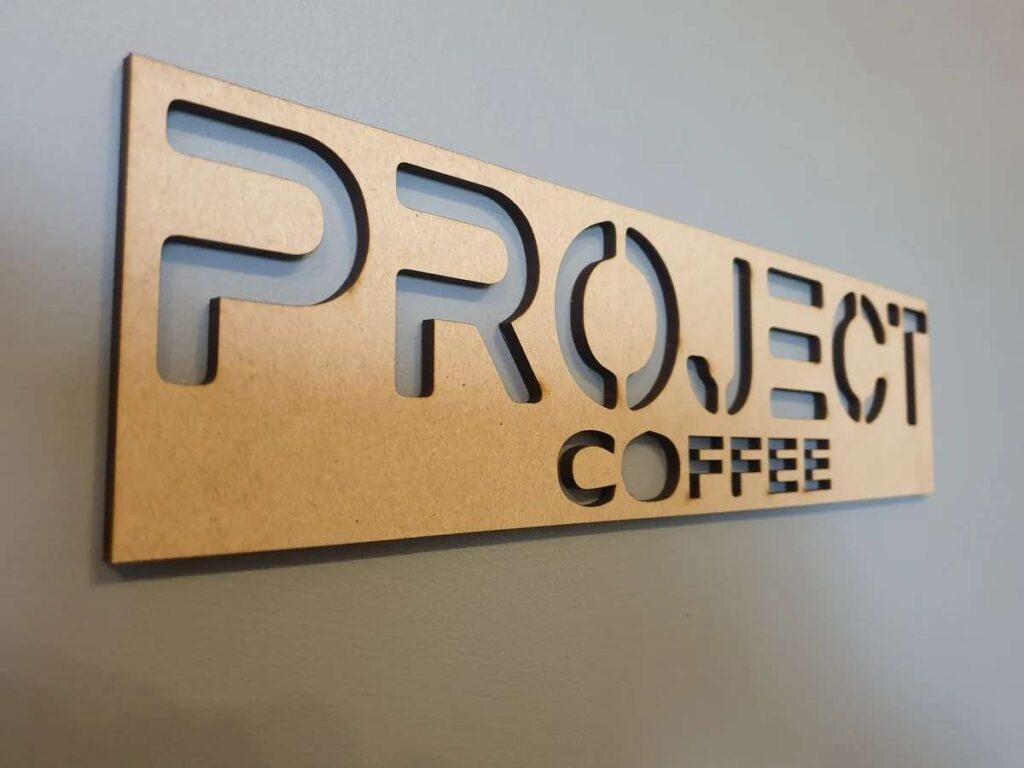
One of my very first projects was a wood-cut logo for a friend’s coffee shop. He didn’t have a big budget, but he wanted something that stood out. I used a simple stencil-style font, added a bit of engraving, and cut it on plywood.
It looked clean. Bold. Professional.
He messaged me a week later—new customers kept asking where he got his sign.
That’s when I realized how valuable signage really is.
Signs are one of the most requested laser cut items.
Think about it. Every business needs a sign. Every event wants a logo. People want name boards, door signs, welcome signs, even custom tags for booths or markets.
Laser cutting makes this easy. You get sharp details, fast production, and lots of ways to customize.
You can create:
- Storefront signage: Helps a business stand out on the street
- Interior labels: Menus, room names, logos on walls
- Event branding: Names, hashtags, or logos for photo areas
Custom signage doesn’t just look good. It helps people find things. It adds personality to space. And it’s one of those items that people come back for again and again.
Ideal Materials & File Types
Here’s what I use most:
- Acrylic: Clean and glossy—perfect for branding
- Wood: Gives a warm, natural look
- Metal: Durable and modern—works great outdoors or with lighting
And for file types:
- SVG or AI: Good for clean design and scaling—just outline your fonts
- DXF: Best if you’re using CNC machines or need precision for installation
Design Tips That Work
If you want your signs to cut clean and hang well, keep these tips in mind:
- Use stencil-style fonts: So the inner parts of letters like “O” or “A” stay attached
- Add mounting holes or slots: Makes installation easier for your clients
- Mix engraving and cutting: Layering adds contrast and a custom feel
Before you start, ask your client where the sign will go—on a wall, a counter, or outdoors. That one question helps guide everything else.
Signage may seem simple. But when done right, it becomes something that people trust to represent their brand. And that’s powerful.
4. Furniture Accents and Inlays
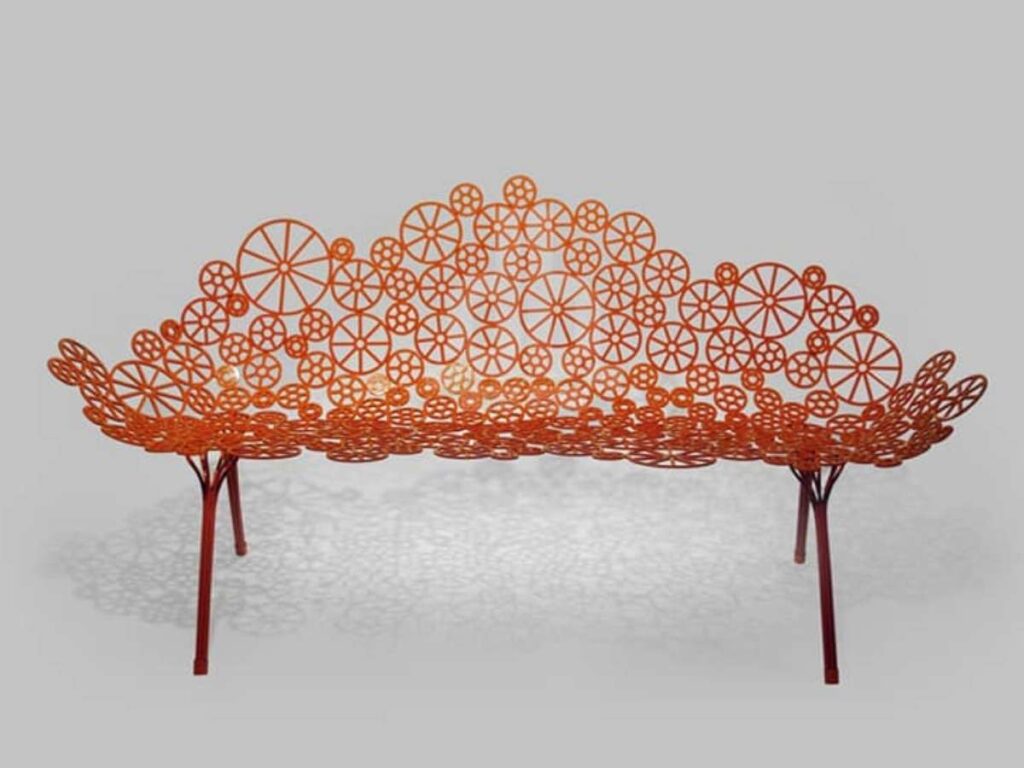
I still have the first cabinet door I added an inlay to. It wasn’t perfect—the pieces were a little loose, and the contrast was too subtle. But it taught me something important: you don’t need to rebuild furniture to make it look new.
With the right laser-cut accent or inlay, even a plain table or drawer front can feel custom-made.
That’s the magic of this design style. Small details. Big impact.
Inlays are a smart way to upgrade surfaces without replacing them. You’re not changing the frame or base of the furniture. You’re just adding visual interest on top.
This works well for:
- Furniture makers: Add detail without extra hardware
- Homeowners: Update old pieces without full refinishing
- Designers: Offer custom touches using thin sheets
I’ve used this idea on cabinet doors, tabletops, shelf panels—even the back of a bench.
Thin laser-cut accents can give a handmade, luxurious feel using low-cost materials. And since you’re just working with surface layers, it’s faster and easier than building from scratch.
Ideal Materials & File Types
For inlays, I recommend:
- Wood veneer: Thin and flexible—great for detailed work
- Thin MDF: Budget-friendly and easy to finish
- Laminate sheets: Durable and smooth for modern looks
- Acrylic or aluminum: Best for bold contrast or high-gloss styles
You’ll want file types that hold small details well:
- SVG: Easy to scale and great for clean curves
- DXF: More precise—especially when cutting for press fits
Always test fit before doing a full batch. Even small changes in thickness matter when working with inlays.
Design Tips That Work
Want your inlays to fit and stand out? Try this:
- Account for kerf: That’s the width of the laser cut—it affects how parts fit
- Use contrast: Try dark wood on light wood, or matte over gloss
- Label parts in your file: This helps if you’re working with a multi-piece or repeating pattern
And here’s a question to ask before you start: Is this purely decorative, or does it need to handle wear? That will help you pick the right material and design style.
Furniture accents aren’t flashy. But they can turn basic pieces into something people stop to admire.
5. Light Fixtures and Lampshades
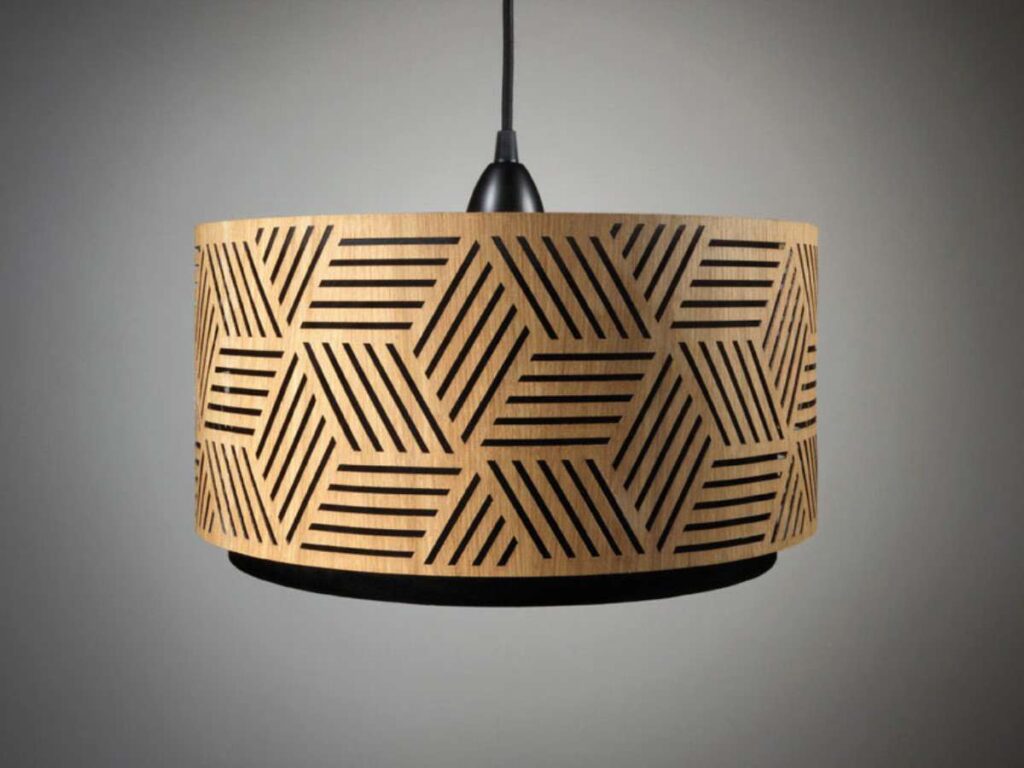
One of my favorite projects was a lampshade I made from scrap birch plywood. I didn’t think much of it at first. But when I turned it on, the shadows on the wall looked amazing. It felt warm and handmade—something you don’t get from store-bought lights.
That’s when I realized how powerful laser-cut lighting can be.
Light fixtures do more than brighten a room. They shape how it feels.
With laser cutting, you can make lights that cast patterns and create mood. People notice them right away—especially in small rooms, cozy corners, or modern spaces.
These are great for:
- Interior designers: Add detail without bulk
- Small businesses: Custom lighting for cafés, salons, or booths
- Personal buyers: Make home lighting look creative and personal
You can sell them flat-packed. Easy to ship, easy to build.
And they’re not just pretty—they’re useful.
Ideal Materials & File Types
Here are the materials I’ve had the best results with:
- Thin birch plywood: It’s lightweight, cuts well, and gives off a soft, warm glow when lit.
- Acrylic sheets: Use these when you want something modern and smooth.
- Frosted or smoked acrylic: These help spread the light evenly, so you don’t get harsh shadows.
Now for the file types:
- DXF: Great for clean cuts—especially when parts need to fit together.
- EPS: Works well for smooth curves and detailed layouts.
Use clean, accurate files. That makes your final cut much smoother.
Design Tips That Work
Here’s what I’ve learned from trial and error:
- Add airflow gaps: Lamps can get warm. Little openings between parts help the heat escape.
- Use tab-slot joints or snap-fit rings: These keep the pieces strong without needing glue or screws.
- Test your design first: Try cutting it from paper or cardboard. Then shine a light behind it to check how the shadows fall.
One question to ask yourself: Do I want soft glow or bold shapes on the wall?
Your answer will shape your design choices. And once you get it right, these lamps turn into conversation pieces people love to show off.
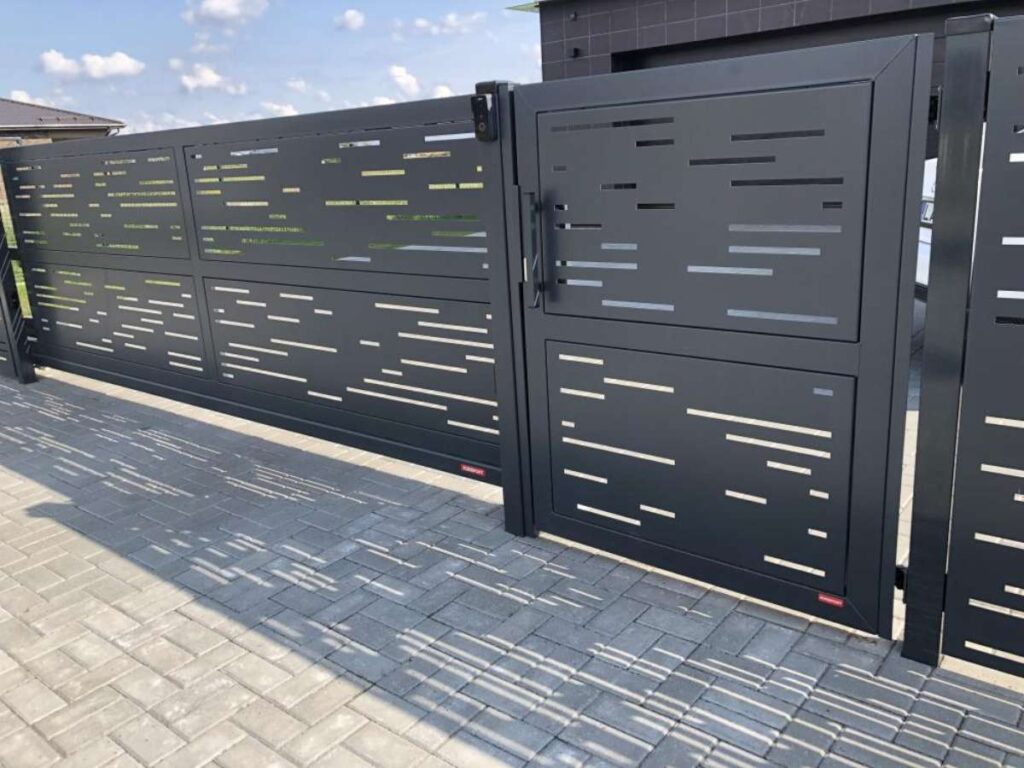
6. Gates and Fencing Panels
If you’ve ever thought about designing a custom gate or fencing panel, you’re not alone. I had the same idea years ago, and let me tell you—my first one didn’t go as planned. The design was too delicate in some spots. It looked nice, but parts bent during install.
That’s when I learned an important lesson: outdoor panels need to be strong first, then beautiful.
And now? I design gates that hold up and turn heads.
You might think of gates as purely functional. But with laser cutting, you can turn them into a statement.
Whether it’s for a villa, a business, or a modern home, custom panels let you add branding, privacy, and style all at once.
These panels are often used in:
- Villas: You can match them to the home’s design
- Clubs or hotels: Add a high-end look to the entrance
- Modern homes: Create privacy without blocking light
Since most of these panels are custom-made, they sell for a higher price. And if you’re offering full-size cutting, this can be a solid product to offer your clients.
Ideal Materials & File Types
If you’re making something for outdoor use, you need the right material:
- Corten steel: Forms a protective rust-like layer—great for weather resistance
- Stainless steel: Resists corrosion—perfect for rain or coastal areas
- Aluminum: Light and easier to install on large frames
Stick to DXF files for this type of work. They keep your cut lines clean and accurate at large sizes.
Design Tips That Work
Here are a few things I’ve learned that’ll help you:
- Use strong borders: Keep the outer edges at least 20–30 mm wide to avoid bending
- Skip fragile patterns: If it looks too thin on screen, it’ll break in metal
- Add mounting holes or slots: That’ll save you trouble during installation
One last question you should ask before cutting: How will the panel be installed?
That answer helps you shape the design from the start—so your final product doesn’t just look good, it works exactly the way your client needs.
7. Vent Covers and Grilles
You probably don’t think much about vent covers—until you need one that doesn’t look terrible.
That’s exactly what happened to me. I was remodeling a small guest room and had done everything right. Fresh paint. New floors. Custom trim. Then I looked down at the old vent and thought, That thing ruins the whole wall.
That’s when I started making laser-cut vent covers. And honestly, they’ve been one of my most practical design ideas ever since.
Most vent covers are plain and stamped from cheap metal. But with laser cutting, you can make covers that actually match the space.
They’re popular in:
- High-end home renovations: Add a polished look without big cost
- Historic restorations: Keeps the style consistent
- Custom interiors: Lets you match other design elements
You get the chance to turn something boring into something beautiful. And since vent sizes are standardized, it’s easy to offer these as a repeat product for resale.
They’re simple to design. Quick to cut. And buyers notice the difference right away.
Ideal Materials & File Types
Here’s what works depending on the use:
- Steel or aluminum: Best for HVAC systems that move real air
- MDF or PVC: Good for decorative-only covers in places like furniture or wall accents
Use these file types to get clean, accurate cuts:
- DXF: Great for exact dimensions and compatibility with most cutters
- SVG: Easy to edit and perfect for custom pattern work
Measure carefully. Even a few millimeters off can affect the fit
Design Tips That Work
Want your covers to function and look great? Here are a few things to try:
- Keep 60–70% open space: That lets enough air through
- Round sharp corners: Helps prevent cuts and makes sanding easier
- Match standard sizes: Like 4×10 or 6×12 inches—it makes reselling much easier
And here’s a tip from experience: Cut a cardboard version first to check fit and pattern. It’s cheaper to fix a mockup than waste real material.
Once you start offering these, don’t be surprised if clients ask for more. They’re small details—but they make a big difference.

8. Store Displays and Fixtures
One of my earliest display projects was for a local candle shop. The owner needed something light, foldable, and fast to set up at markets. We designed a set of interlocking stands using MDF and labeled every part for easy assembly.
It packed flat in the trunk and was ready in 10 minutes. That’s when I saw how valuable laser-cut displays could be—both for sellers and for customers.
A good display does more than hold products. It controls how items are seen, touched, and remembered.
With laser cutting, it’s easy to create:
- Flat-pack fixtures: Simple to store and ship
- Modular shelves: Rearranged quickly based on the product
- Branded stands: Designed with logos or custom shapes
These displays are useful at pop-up shops, boutiques, trade booths, and craft markets.
Since they’re lightweight and easy to assemble, they’re perfect for vendors who are always on the move.
At MachMaster, we fabricate laser-cut display parts in both metal and acrylic—ready for assembly with clean edges, protective coatings, and tight-fit joints that make setup simple.
Ideal Materials & File Types
Different uses call for different materials:
- MDF: Strong and stable—good for holding weight
- Acrylic: Sleek and clean—great for high-visibility displays
- Foam board or PVC: Light and cheap—best for short-term use
For file types:
- SVG: Easy to scale and label—great for snap-fit joints
- DXF: Accurate and compatible with most cutting software
Always label each part in the file. It makes setup faster and reduces confusion—especially when sending kits to others.
Design Tips That Work
Here are a few ideas that help displays last longer and work better:
- Plan for weight: Make wide bases or lower shelves to avoid tipping
- Add branding areas: Include cutouts or engraved zones for logos
- Stick to snap-fit joints: Keeps the build tool-free and fast
Before cutting, ask this: Will the display be reused often or tossed after one event?
That answer makes a big difference when choosing materials and joint strength.
Well-designed displays help products look better. And when done right, they help sellers work smarter too.

9. Garden & Outdoor Decor
A backyard doesn’t need much to feel special. A few small touches—like a garden sign, lantern, or trellis—can completely change how the space looks and feels.
A while back, I made a simple metal sign with a leaf pattern for a neighbor’s front yard. It wasn’t fancy, but once it was up, people started asking where they could get one too.
That’s the power of outdoor decor. It adds personality. And people notice.
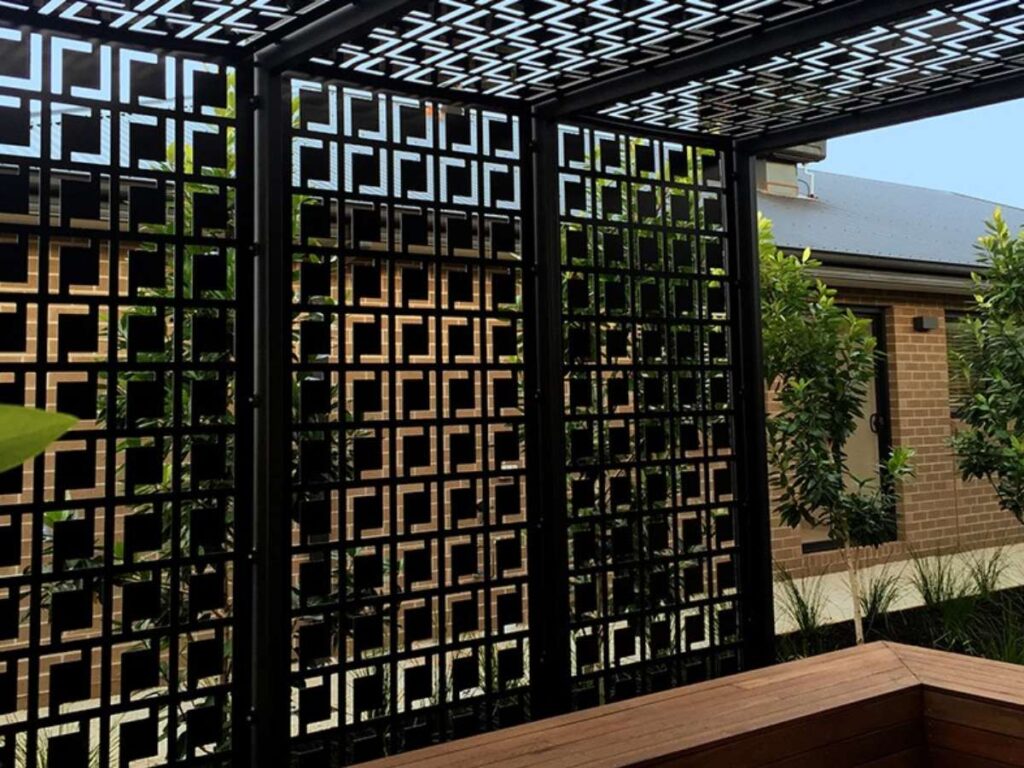
Decor for outdoor spaces is a strong niche.
Whether someone has a full garden or just a balcony, they usually want to decorate it. Laser-cut pieces work especially well because they can be detailed, durable, and personal.
Popular outdoor items include:
- Garden signs: Names, quotes, or seasonal messages
- Lantern covers: Create shadows and glow after dark
- Trellises: Support climbing plants while adding design
- Yard stakes: Mark plant rows, paths, or corners
These items are easy to personalize, which makes them perfect for gifts or seasonal sales. They’re also lightweight, simple to cut, and great for small-batch production.
Ideal Materials & File Types
Outdoor conditions are tough—sun, rain, and wind. Use materials that last:
- Powder-coated steel: Resists rust and holds up over time
- Corten steel: Forms a weathered look that protects itself
- Painted wood: Works well in covered areas or for short-term use
- Weather-safe plastic: Light and easy to work with
For files:
- DXF: Gives you precision for laser cutting
- SVG: Good for previews or adjustable design work
Design Tips That Work
Want your design to last outside?
- Go for thick, simple shapes: They hold up better in wind and moisture
- Add holes or built-in stakes: Helps people install the piece quickly
- Avoid thin connectors: These snap easily after a few days of bad weather
It also helps to ask: Where will this be placed? On a fence, in the ground, or hanging on a wall?
Once you know that, you can shape your design to match—and give your customers something that lasts.
10. Artistic Wall Art and Custom Installations
A quiet room can feel completely different once wall art goes up. I once helped a friend install a laser-cut skyline piece in her hallway. It was layered wood, painted in soft gray and navy tones. Nothing loud—but every guest who visited stopped to stare at it.
That’s the thing about laser-cut wall art. It pulls people in without trying too hard.
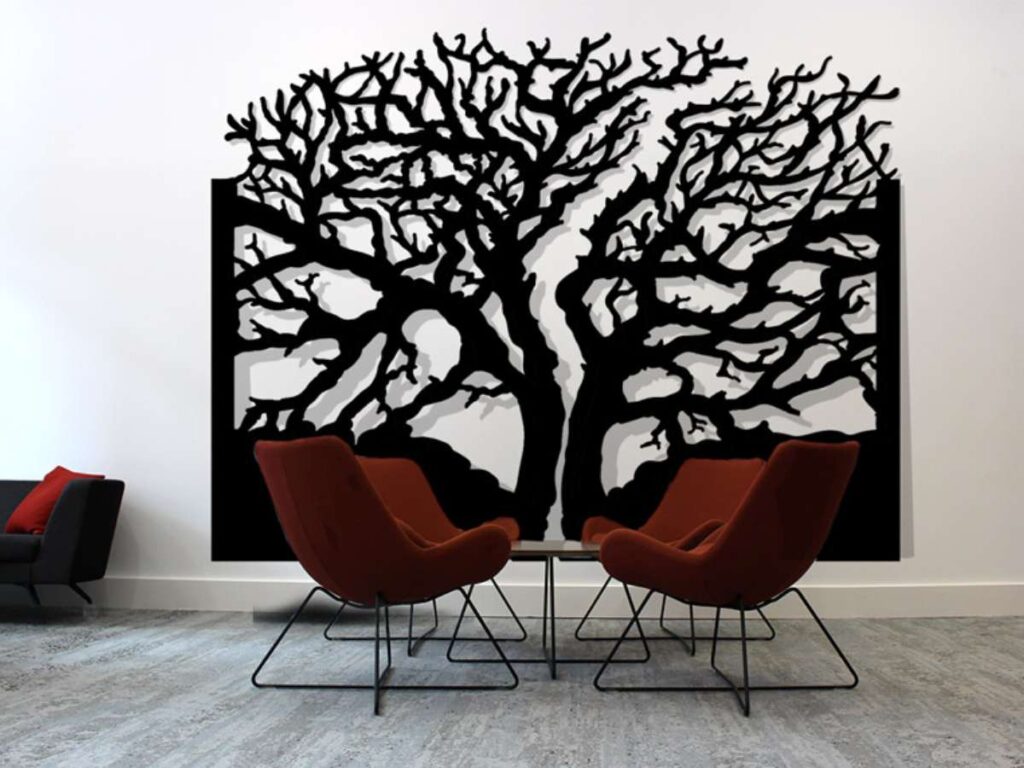
Wall art isn’t just decoration. It brings feeling to a space. It adds texture, color, and depth where there was once just emptiness.
Laser-cut art fits almost anywhere:
- Homes: Bedrooms, living rooms, hallways
- Commercial spaces: Restaurants, salons, waiting rooms
- Galleries: Statement pieces that stand out
- Events: Name signs or themed backdrops
You can make abstract shapes, detailed mandalas, layered animals, or city skylines. Since every piece feels personal, people are willing to pay more—especially if you offer custom options.
Ideal Materials & File Types
Material choice changes the mood of the piece. Want something bold? Go with metal. Want something soft or rustic? Choose wood.
Here are the top picks:
- Plywood: Easy to layer and paint—great for texture
- Acrylic: Smooth and glossy—gives a modern look
- Metal sheets: Strong and sharp—perfect for large-scale pieces
As for design files:
- AI/SVG: Best for planning layers and adjusting details
- DXF: Final format for clean, accurate laser cutting
Always check the scale. Wall pieces often get resized—and that can throw off your spacing.
Design Tips That Work
Here’s what I’ve learned from making art that actually gets hung up:
- Break large pieces into sections: Easier to cut, ship, and install
- Use contrast: Dark and light layers add depth and shadow
- Add mounting slots or guides: Helps people hang the piece straight
Before starting a design, ask yourself: Is this meant to blend in—or be the focal point?
That answer will shape everything—from the cut lines to the finish.
Laser-cut wall art isn’t just another product. It’s something people feel. And when it’s done right, it becomes part of the story a space tells.
Conclusion
Laser cutting opens the door to more than just products—it gives you the power to create useful, beautiful pieces people want to buy.
We’ve explored 10 proven design ideas, each one built on real-world use, real materials, and lessons learned.
Whether you’re making one piece or launching a product line, this is a guide you can keep coming back to.
Need help deciding where to start?
More Guides and Tips to Explore
We’ve got more for you! These articles provide more tips and guidance to keep you on track:
Still haven’t found what you’re looking for? Don’t hesitate to contact us. We’re available around the clock to assist you.