
I used to think all keyboard kits were pretty much the same.
Then I bought one that looked nice—but sounded hollow and felt rough with every keystroke. I thought I was upgrading. Instead, I wasted time and money.
That experience taught me something: it’s not just about specs. It’s about how the keyboard holds up in real use.
If you’re looking at the Cycle7 Keyboard Kit, you’re probably asking yourself the same thing I did—is it worth it?
In this article, I’ll share my honest take after putting it to use. You’ll learn what makes it different, who it’s right for, and what to expect from the build.
I’ll also give you a simple way to decide if it’s the right fit for your setup—whether you’re upgrading or buying your first kit.
So let’s get started!
1. Key Specifications and Build Options
Before you spend money on a keyboard kit, you want to know what you’re really getting. That’s how I felt before building my Cycle7. The specs looked solid—but I’ve been burned by pretty numbers before. This time, things matched up. Let’s take a closer look.
Hot-Swappable or Soldered?
- Hot-swappable means you can pop switches in and out. No soldering required. Great if you like testing different switch types.
- Soldiers require tools and time. It gives a more “locked-in” feel, but you’re stuck with your choices.
I went hot-swap. Swapped three switch sets in one week. No regrets.
Layout Options
- 60%: super compact, no arrow keys
- 65%: still compact, but includes arrows
- Tenkeyless (TKL): drops the number pad but keeps function keys
I prefer 65%. It gives me enough space without taking over my desk. If you write a lot, it’s a good middle ground.
Case Materials
- Aluminum: heavy, solid, premium feel
- Polycarbonate: lighter, softer sound
- Acrylic: see-through, looks great with RGB lighting
Mine’s polycarbonate. It feels smooth and dampens sound just enough for late-night typing.
Compatibility & Stabilizer Support
It works with MX-style switches, which is the most common type (like Cherry MX, Gateron, and others). That gives you a lot of flexibility.
For stabilizers (used on big keys like spacebar), it supports both plate-mounted and PCB-mounted styles. I used the Durock V2s—quiet, smooth, no rattle.
Mounting Style
You’ve got gasket mount, which is what I used.
Gasket mount means the plate floats inside the case on rubber strips. That softens keystrokes and makes the typing feel smooth. Bonus: it’s quieter too. Great if you’re in a shared office or take video calls all day.
Other kits may be used:
- Top mount: plate screws to the top shell. Stiffer feel.
- Tray mount : plate sits on the case bottom. Cheaper but less even.
Quick Spec Comparison
| Feature | Cycle7 | Competitor A | Competitor B |
| PCB | Hot-swap / Solder | Solder only | Hot-swap |
| Layouts | 60%, 65%, TKL | 60% only | 65%, TKL |
| Case Material Options | Aluminum, PC, Acrylic | Aluminum only | PC, Acrylic |
| Mounting Style | Gasket | Top mount | Tray mount |
| Stabilizer Support | Plate & PCB | PCB only | Plate only |
The Cycle7 doesn’t just check boxes. It gave me options that fit how I like to work—and freedom to change things later.
If you’re looking for something that blends comfort, flexibility, and a real typing upgrade, the specs speak for themselves.
2. What’s Included in the Box
The first time I opened a keyboard kit box, I panicked.
No switches. No keycaps. Just a bunch of parts I didn’t recognize.
That’s why I want to walk you through exactly what comes with the Cycle7 Keyboard Kit—and what doesn’t. If you’re buying for yourself or ordering in bulk, this section will help you avoid surprises.
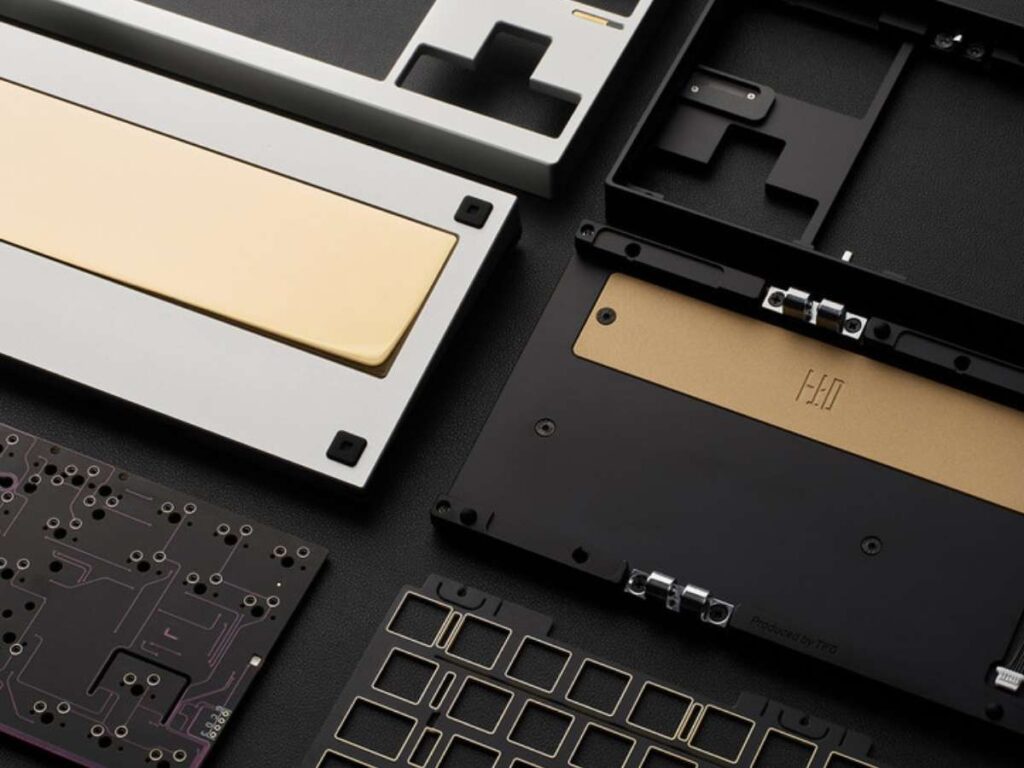
- Case (your choice of material): Mine was polycarbonate—lightweight, clean finish, no scuffs.
- PCB (Hot-swap or Soldered): I picked hot-swap, and all sockets were secure. No bent pins.
- Plate (usually aluminum): It holds the switches in place. Feels solid and fits snug.
- Foam layers (optional, but mine had 2): One sits between PCB and plate. One goes under the PCB. This helps dampen sound and reduce hollow typing noise.
- Screw set and rubber feet: Easy to install. The screws didn’t strip, which has happened on cheaper kits.
- Keycap puller and switch puller: Basic but useful. If you’re switching things often, you might want higher-end tools later.
- USB-C cable: Black, braided, and long enough for most setups.
- Quick-start card with QR code: Scan it to get a digital guide. Mine loaded instantly and had step-by-step build photos. No digging through forums or guessing what goes where.
Not Included:
- Switches (MX-style): I used Gateron Browns for this build. Smooth feel, quiet sound.
- Keycaps: Choose based on layout (60%, 65%, etc.). I went with PBT keycaps for a better texture and less shine over time.
- Stabilizers : Mine didn’t come with stabs, so I added Durock V2s. (sometimes included, but check before you buy)
If you’re planning a team purchase or just building for yourself, knowing what’s in the box helps you plan better.
For me, the clear layout and clean packaging made the build feel easy—even before I touched the first switch.
3. Build Quality and Design Aesthetics
Let’s talk about what it feels like—not just the specs, but the moment you pick it up, build it, and actually type on it.
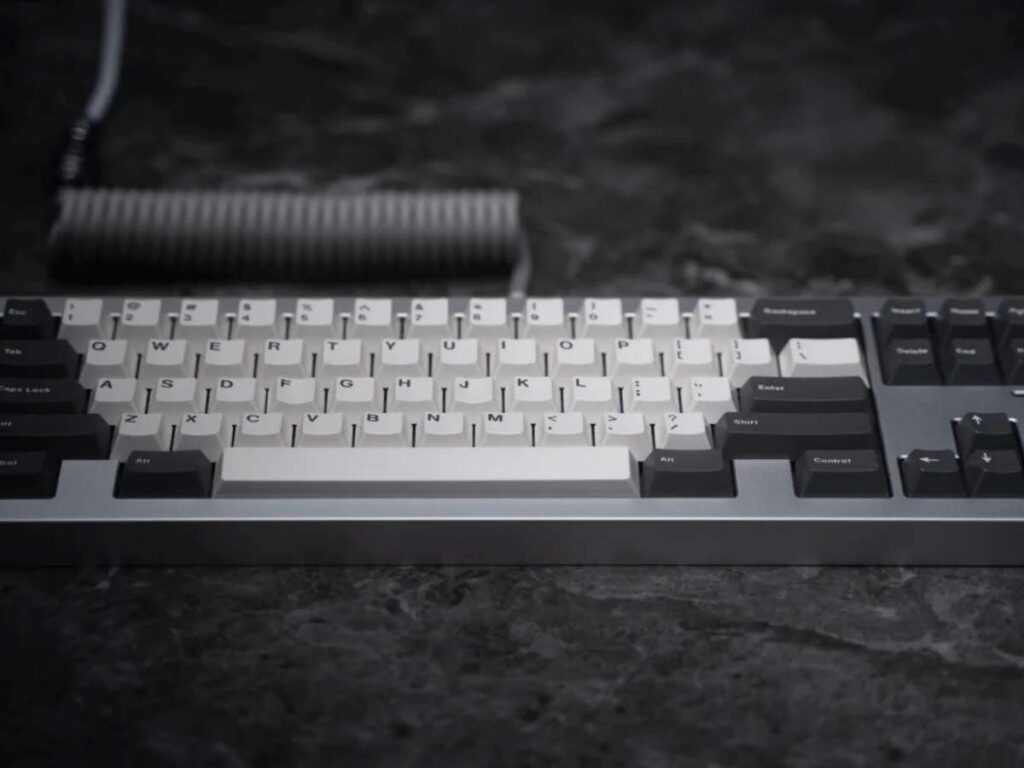
When I built my Cycle7, the first thing I noticed was the weight. It wasn’t heavy in a bad way. It just felt solid. No flex. No rattles. Like something that belonged on a clean desk, not tucked away in a drawer.
Weight and Sturdiness
- Weight: Enough to stay put. Doesn’t slide around.
- Fit: All parts lined up. No forcing. No gaps.
- Stability: No flex in the body. Feels tough, even under pressure.
You’ll notice the difference as soon as you press the first key.
Tight Tolerances and Smooth Finish
- No loose screws
- No uneven edges
- No machining marks
The case I used had a soft matte finish—smooth to the touch with a clean look from every angle.
If you care about how your keyboard feels in your hands before you even power it on, Cycle7 delivers.
Sound Dampening and Flex
The foam and gasket mount setup changed everything. Typing felt soft, not mushy. The board stayed quiet—no ping, no hollow echo.
- Acoustics: Thocky and muted
- Plate flex: Just a little, enough for comfort
- Overall feel: Gentle, smooth, easy on the fingers
If you work in a quiet office or type for long hours, this makes a big difference.
Minimal Design and Branding Potential
- Color choices: I went with fog gray. Subtle, modern.
- Logo-free: Great for custom branding or team builds.
- USB port: Centered, flush, and tidy. No weird cutouts.
You could leave it as-is. Or laser your logo if you’re buying for a company. It works either way.
Final Verdict
The Cycle7 doesn’t try too hard. It doesn’t need to. From build to look to sound, everything just feels well-made. And if you’re like me—someone who cares about how things feel as much as how they look—this kit delivers both.

4. Assembly Process: Step-by-Step Guide
I’ll be honest—my first keyboard build took hours. I was nervous. Watched five videos. Still got stuck.
The Cycle7 Keyboard Kit? Much smoother. If you follow a few simple steps, you can build it in about 45–60 minutes. Faster if you’ve done this before.
Whether you’re building your own or setting up multiple units for a team, this section will help you move with confidence.
Pre-Assembly Checklist
- The Cycle7 kit (case, PCB, plate, foam, screws)
- Stabilizers (plate or PCB-mount)
- Switches (MX-compatible)
- Keycaps (based on your layout)
- Tools:
- Small Phillips screwdriver
- Keycap puller (included)
- Switch puller (included)
- Optional: tweezers and a switch opener
Set everything on a clean, flat surface. Good lighting helps too.
Step-by-Step Build
- Install stabilizers: Clip stabilizers into the PCB or plate for larger keys like spacebar, enter, and shift.
- Insert switches: Push each switch into the plate until it clicks, making sure the pins align with the PCB holes below.
- Align PCB and plate: Line up the PCB under the plate so all switch pins poke through without bending.
- Add foam (if included): Place foam between the plate and PCB or underneath the PCB to help reduce sound and vibration.
- Close the case: Carefully lower the top assembly into the case and secure it with screws without overtightening.
- Attach rubber feet: Stick on the rubber feet to the bottom of the case for grip and desk protection.
Is This Beginner-Friendly?
Yes. If it’s your first build, this kit is a good starting point. The hot-swap PCB, clear layout, and included tools help a lot.
And if you’re building in bulk—each unit goes faster once you’ve done one.
It’s a hands-on project, but nothing too tricky. And once it’s built, you’ll feel proud every time you press a key.
5. Customization Possibilities
One of the best things about the Cycle7 Keyboard Kit is how easy it is to make it feel personal.
Whether you’re a hobbyist, a minimalist, or buying for a team, this kit gives you the tools to match your setup—both in feel and look.
Keycap and Switch Compatibility
The Cycle7 works with MX-style switches, which means:
- Cherry, Gateron, Kailh, and more will fit
- Hot-swap PCB lets you change switches anytime (no soldering needed)
- Great for testing different sounds or feels over time
As for keycaps, most standard sets fit:
- Supports layouts like 60%, 65%, and TKL
- Uses standard MX stems for easy swapping
- Compatible with PBT, ABS, or artisan caps
I’ve used both low-profile and sculpted caps—both snapped in perfectly.
RGB Lighting Support
- Per-key RGB: Each key lights up individually
- Underglow: Optional, but looks amazing in clear or acrylic cases
Want soft white? You got it. Want wild rainbow waves? That’s an option too.
It looks clean during the day and adds personality at night.
Software Support (VIA + QMK)
You can customize your keymap using:
- VIA: Web-based and beginner-friendly
- QMK: More advanced, gives deeper control over layers and macros
I mostly use VIA. It takes seconds to remap a key, and the testing feature helps when debugging your build.
For teams, it’s helpful. One layout file can be cloned to all units fast.
Modding and Case Swaps
- Foam mods: Easy to add for quieter sound
- Switch lubing: Simple if you use hot-swap sockets
- Stabilizer swaps: Supports both plate and PCB styles
- Case changes: Buy a new top shell and keep the internals
Note: Only soldered PCBs require tools if you want to change switches later.
Match It to Your Brand or Desk
You can keep things clean and neutral—or match your brand colors.
- Add blue and gray caps for your company’s theme
- Choose a metal case for a premium office setup
- Laser a logo onto the case (some users do this for client gifts)
With Cycle7, it’s easy to build something that feels like yours—not just another keyboard.
6. Pricing and Value for Money
Let’s get to the big question: Is the Cycle7 Keyboard Kit worth it?
Short answer—yes, if you care about quality, feel, and flexibility. But let’s break it down so you can decide for yourself.
Current Price Range
The Cycle7 Keyboard Kit usually costs between $120 to $180 USD, depending on:
- Case material (aluminum costs more than polycarbonate)
- PCB type (hot-swap often adds to the price)
- Extras like foam or RGB features
You’ll still need to buy switches, keycaps, and stabilizers if they’re not included. That can add another $40–$100, depending on your choices.
What You’re Paying For
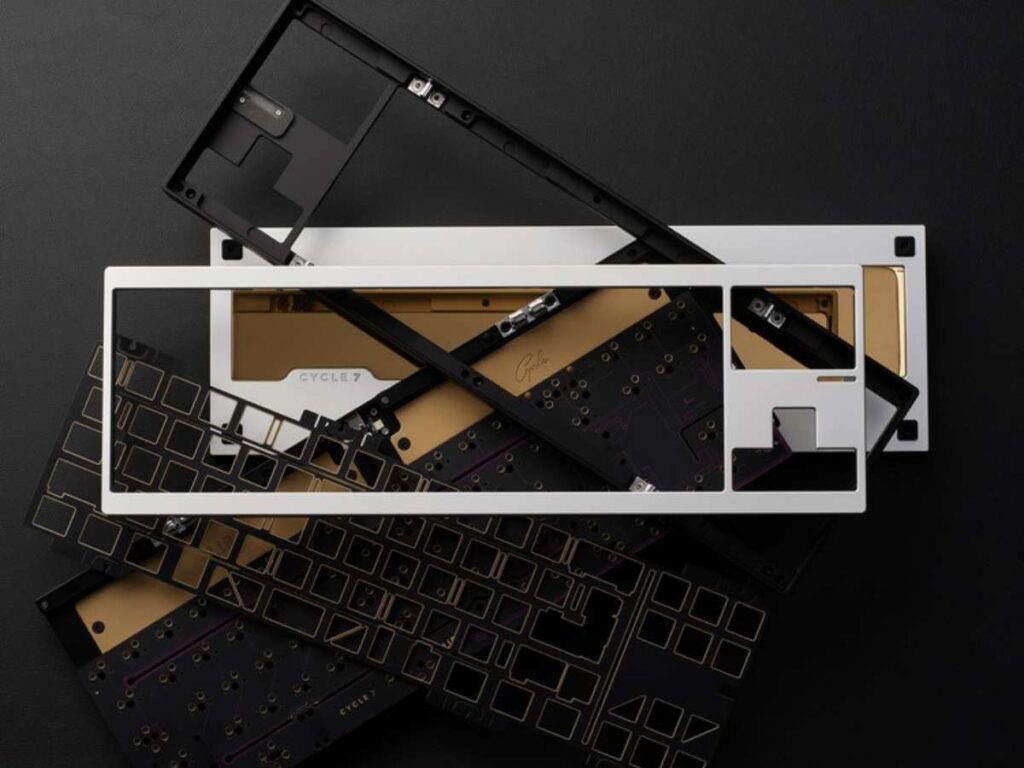
- Core parts: PCB, case, plate, foam, screws
- Build quality: Clean machining, tight fit, smooth finish
- User experience: Hot-swap options, modding support, QMK/VIA compatibility
- Lifespan: Built to last multiple switch/keycap swaps over the years
My build still feels fresh months later. And I’ve already switched switches twice without any issues.
Value Matrix: Price vs. Features vs. Support
| Feature | Cycle7 Kit | Basic Kit ($80) | High-End Kit ($200+) |
| Hot-swap PCB | Yes | No | Yes |
| Gasket mount | Yes | No | Yes |
| VIA/QMK compatibility | Both | Limited | Both |
| Case material options | 3 options | 1 basic shell | 2–3 options |
| RGB lighting | Per-key + underglow | None | Full support |
You’re getting mid-to-high-end features at a mid-range price. That’s where the value is.
For Teams and Bulk Buyers
If you’re deploying multiple keyboards—for an office, dev team, or content studio—this kit makes sense.
- Easy to standardize layouts across users
- Clean design fits most work environments
- Hot-swap saves time if a switch fails
Bulk pricing might be available from some vendors. Worth asking if you’re ordering 10+ units.
It’s not the cheapest kit out there.
But if you value comfort, quiet typing, solid build, and options to grow with—Cycle7 earns its price tag.
You get what you pay for—and in this case, a little more.
7. Final Thoughts and Buying Tips
So, is the Cycle7 Keyboard Kit right for you?
If you want a keyboard that feels smooth, looks clean, and gives you room to grow—then yes, it’s a solid pick.
I’ve built a few kits over the years, and this one left me impressed.
Who This Kit Is Best For
- Personal users: If you love a smooth typing feel and want to try modding, this is a great starting point.
- Office teams: Clean look, quiet sound, and easy layout control with VIA make this a great option for shared workspaces.
- Designers: Want a blank canvas to match your desk or brand? This kit’s unbranded design and lighting support help with that.
Whether you’re building one or ten, it’s flexible enough for different setups and preferences.
Common Mistakes to Avoid
- Don’t forget to buy switches and keycaps: The kit doesn’t include them by default.
- Double-check your layout: 60%, 65%, and TKL all use different keycap sizes.
- Take your time with stabilizers: A good install here makes a big difference.
- Avoid overtightening screws: Especially if using acrylic or polycarbonate cases.
Where to Buy
You can find Cycle7 on:
- The official Cycle7 website
- Trusted mechanical keyboard vendors like KBDfans, MechMarket, or KeebsForAll
- Sometimes available on group buys or Discord communities
Stick with known sellers to avoid knock-offs or incomplete kits.
Should You Buy It? (Quick Checklist)
- Want hot-swap support?
- Need quiet, soft typing?
- Like to mod and customize later?
- Prefer clean, minimal design?
- Building for a team or shared space?
If you checked 3 or more, this kit is likely a good fit.
What to Pair With It
- Switches: Try Gateron Browns (tactile) or Silent Reds (quiet)
- Lube kit: Krytox 205g0 for switches, dielectric grease for stabs
- Keycaps: PBT sets for better feel and long-term wear
- Cable: Custom coiled USB-C for style, or just a braided straight cable
At the end of the day, a keyboard is something you use every day.
Cycle7 makes that daily experience smoother, quieter, and more enjoyable.
And that’s what makes it worth it.
Conclusion
I’ve been where you are—wondering if the Cycle7 was worth it.
Now I know it is.
We covered the feel, the sound, the build, and the real differences that specs alone don’t show.
This kit surprised me—in the best way.
It fits right into my workflow, without the rough feel or hollow sound I once dreaded.
If you want your desk to feel better, sound cleaner, and just work, this is worth your time.
What do you value most in a keyboard kit?
Your setup deserves better.