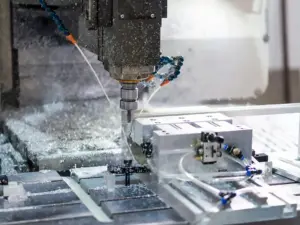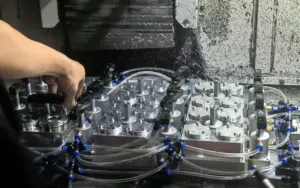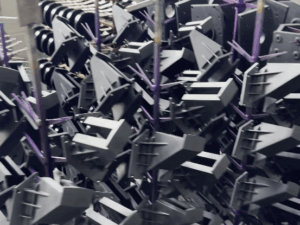

I didn’t think a little bit of extra plastic could cause so much trouble—until I saw injection mold flash for the first time.
It looked small. Just a thin line sticking out along the edge of a part. But that tiny flaw? It led to delays, returns, and some very unhappy customers.
If you’ve ever had to explain why a part wasn’t right, I know how that feels. I’ve had long shop talks, tough phone calls, and way too many questions about “what went wrong.”
That’s why I wrote this guide—for you.
Maybe you design parts. Maybe you order them. Or maybe you just want to understand how to avoid bad batches. No matter where you’re starting, I’ve got your back.
You’ll learn:
- What injection mold flash is
- Why does it happens
- How to fix it
I’ll share 9 simple tips I’ve used myself. No hard words. Just real advice that works.
Ready? Let’s go!
Quick Chart
Before diving into the full details, here’s a quick look at the 9 key tips we’ll be covering. This table gives a snapshot of each area that helps stop flash before it starts.
| Tip # | Focus Area | Core Idea | Key Actions |
| 1 | Maintain Proper Mold Clamping Force | Weak clamp force lets plastic leak through the parting line. | Know the required tonnage, match machine to mold, watch for mold flexing, clean platens, run trial cycles. |
| 2 | Regularly Inspect Mold Parting Lines | Small damage or wear in the seam causes flash over time. | Clean parting surfaces, check for dings, inspect alignment features, use feeler gauges, log maintenance. |
| 3 | Adjust Injection Speed And Pressure | High speed or pressure forces plastic into unwanted gaps. | Start with lower speed, fine-tune holding pressure, watch short shots, use multi-stage injection, review pressure curves. |
| 4 | Use Correct Viscosity Material | Too-thin plastic flows too easily and escapes through mold gaps. | Check resin data, use consistent grades, pre-dry resin, adjust temps, test new batches. |
| 5 | Check And Replace Worn Components | Worn-out parts can’t hold the mold closed properly. | Inspect alignment parts, check inserts, measure wear, track recurring flash spots, keep a replacement schedule. |
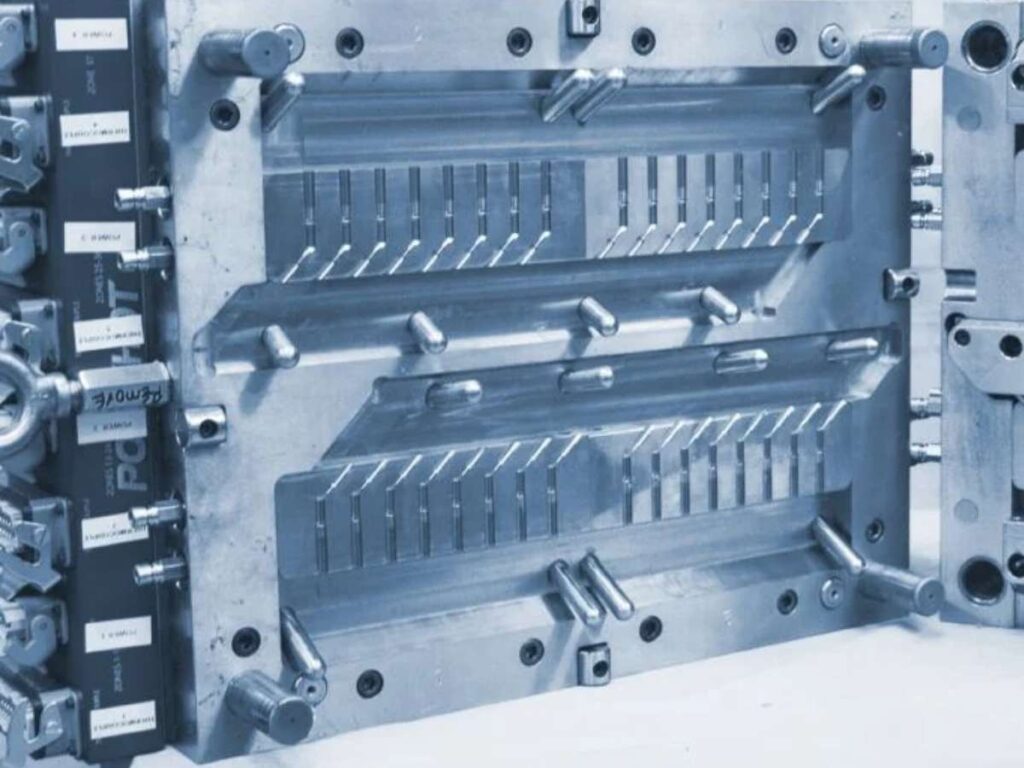
| 6 | Optimize Mold Venting | Poor venting traps air, forcing plastic to escape through weak points. | Clean vents, check depth, add vents near trouble spots, use vent grooves, inspect for burn marks. |
| 7 | Control Barrel Temperature Zones | Too much heat makes plastic too runny, leading to leaks. | Check zone settings, monitor hot spots, follow material guidelines, smooth temp transitions, verify with an external tool. |
| 8 | Use Valve Gates To Control Flow | Flow imbalance across cavities can cause flash or short shots. | Set gate timing, balance flow, use sequential gating, check pin wear, run flow simulation. |
| 9 | Incorporate Shut-Off Features In Design | Gaps at shut-off areas allow plastic to escape. | Add steep angles, use overlapping shut-offs, avoid sharp corners, monitor high-pressure zones, run mold flow simulations. |
Now that we’ve seen the full list, let’s break each one down—starting with clamping force.
1. Maintain Proper Mold Clamping Force
One of the earliest mistakes I made with injection molding was ignoring clamping force.
The mold closed. The cycle ran. The parts came out looking okay—until closer inspection revealed thin lines of flash creeping out from the seam. At first, I blamed the mold. Then I realized the real issue was how the machine was set.
What To Do
Here are five simple actions that help stop flash related to clamp issues:
- Know The Required Tonnage: Figure out how much force needed based on part size and injection pressure. Most parts need around 2 to 5 tons per square inch of projected area.
- Match The Machine To The Mold: Using a machine that’s too large can apply uneven pressure across the mold. This can result in poor sealing and more flash.
- Watch For Mold Flexing: If mold is bending during injection, the halves won’t stay aligned. That leaves small openings where plastic can escape.
- Keep Platens Clean: Dirt, old plastic, or grease on the platens can affect how tightly the mold sits. That small gap can cause flash even with proper clamp settings.
- Run Trial Cycles After Setup: Short runs help you catch small issues before they grow. It’s the easiest way to spot flash early without wasting material or time.
Still seeing flash even after adjusting clamp settings? It could be a sign of worn components or parting line issues.
Clamping force may seem like a small detail, but in my experience, it’s where many flash issues begin. Taking a little extra time to set it right has saved me from missed deadlines, unhappy clients, and costly rework more times than I can count.
2. Regularly Inspect Mold Parting Lines
For a long time, I thought once a mold was set up right, it would just keep running fine. But then flash started showing up—on a mold that had always worked perfectly.
We checked everything. Clamping force was solid. Pressures and temperatures looked normal. But then I spotted it—a small mark along the parting line. That tiny gap was enough to let plastic leak out.
What To Do
Here are the steps that made a difference for us:
- Clean The Parting Line Surfaces: Remove dirt, grease, or leftover plastic with a soft brush and clean cloth. This helps keep the sealing surfaces smooth and tight during every cycle.
- Check For Dings Or Scratches: Use a flashlight and fingertip to spot even small damage that could affect the seal. Minor flaws can let plastic leak through under pressure.
- Inspect For Wear On Alignment Features: Look closely at guide pins, bushings, and interlocks that help keep the mold aligned. If these parts wear out, the mold halves won’t close evenly.
- Use Feeler Gauges To Measure Gaps: A small tool can show if there’s space where there shouldn’t be. Even a slight mismatch can cause flash to appear.
- Log Inspections In A Maintenance Schedule: Regular checks help catch changes early—before flash gets worse. Keeping records also makes it easier to track wear over time.
When flash starts showing up for no clear reason, the parting line is often the quiet troublemaker. Taking a closer look can help you fix problems early and keep production moving without flash or delays.
MachMaster helps identify hidden flaws early and keeps production running smoothly—without flash or callbacks.
3. Adjust Injection Speed and Pressure
Injection speed is how fast the molten plastic flows into the mold. Pressure is how hard it gets pushed. When either one is too high, the plastic forces its way into gaps, especially at the parting line or vents. Flash forms before anything else can react.
It’s not always about going faster or harder. It’s about getting it just right.
What To Do
Here’s what works well during setup and testing:
- Start With Lower Speeds: Slowing the fill rate reduces turbulence and helps keep plastic from slipping into small openings.
- Fine-Tune Holding Pressure: Lower holding pressure can help stop plastic from being pushed out during the pack and hold stage. Y
- Watch Short Shots First: Running a short shot (when the mold isn’t fully filled) gives you clues about how the plastic is flowing.
- Use Multi-Stage Injection: Try starting with a slower speed, then increase it after the material clears tight sections. This lets the mold seal properly before the higher pressure kicks in.
- Review Pressure Curves In Real-Time: If machine shows pressure data, watch the curve closely for sudden spikes. These spikes can point to flow restrictions or areas where flash could start.
Tuning speed and pressure is more than just tweaking numbers on a screen. It’s a way to give the material time to flow correctly, without forcing problems into the part. Taking the time to get this right has saved me from wasted runs more times than I can count.
4. Use Correct Viscosity Material
Viscosity is how thick or thin a material flows. High-viscosity plastic is thicker and flows slower. Low-viscosity plastic is thinner and flows faster. When the material is too thin, it can slip into gaps in the mold. That’s where flash starts.
A lot of people don’t think about material flow when troubleshooting flash, but it makes a big difference.
What To Do
Here are a few ways to keep material viscosity in check:
- Check The Resin’s Data Sheet: Look for melt flow index or viscosity values before loading a new material.
- Use Consistent Resin Grades: Switching to a different brand or grade can change how the material flows. Even small changes in formulation can lead to unexpected flash.
- Pre-Dry The Resin If Needed: Moisture in the plastic can affect how it melts and flows, especially in materials like nylon.
- Adjust Temperature Settings By Material: Higher temps can lower viscosity, so match the barrel zones to what the resin needs. If it runs too hot, plastic may become too thin and leak into parting lines.
- Run Small Batch Tests With New Resin: Always test flow and fit before a full run when using a new batch or supplier.
Flash isn’t always caused by the mold or machine—sometimes, it’s the material. When you understand how each resin behaves, you avoid costly mistakes and unexpected mess.
5. Check and Replace Worn Mold Components
Molds are like any tool. Over time, parts wear down from heat, pressure, and cycles. When components like ejector pins, guide pins, inserts, or bushings wear out, they stop holding the mold together tightly. That’s when gaps form—and flash follows.
It’s easy to overlook wear until it causes defects.
What To Do
Here’s how to stay ahead of worn components:
- Inspect Alignment Features Regularly: Guide pins, bushings, and interlocks must stay tight to keep the mold closed evenly. If any of these loosen, they create space for flash to form.
- Check Inserts And Core/Cavity Blocks: Look for signs of movement, cracks, or wear that affect sealing surfaces. Even a slight shift can leave the mold misaligned during injection.
- Measure For Wear: Use calipers or gauges to compare parts against original specs. Regular measurements help spot slow changes before they lead to defects.
- Watch For Repeat Flash In The Same Spot: Flash showing up in the same area might point to a worn part underneath. It’s a strong clue that something isn’t holding the mold tightly anymore.
- Keep A Replacement Schedule: Logging mold cycles and scheduling checks helps catch wear before it becomes a problem.
Ignoring worn parts always costs more in the long run. When you replace them early, you avoid scrap, downtime, and last-minute pressure on your team.
6. Optimize Mold Venting
I remember a time when flash kept showing up in strange places. The clamp was tight. The material was right. Everything should have worked. Then someone suggested checking the vents. That was it.
Vents don’t need to be deep. In fact, they’re usually just shallow grooves, but they make a big difference.
What To Do
Here are the steps that helped fix our flash issues caused by poor venting:
- Clean Vents Often: Vents can clog with plastic or dust, especially after long runs. If you don’t clear them, trapped air builds pressure and causes flash.
- Check Vent Depth And Width: Most vents are between 0.001 and 0.003 inches deep—small, but important. If vents are too shallow or worn, they stop working properly.
- Add Vents In Trouble Spots: If flash keeps showing up in one area, it may need extra venting. You can add small grooves near that location to help air escape.
- Use Vent Grooves Near Thin Walls: These areas trap air fast and are more likely to flash without help. A simple vent in the right spot often solves the issue.
- Inspect For Burn Marks: Burned edges often mean gases couldn’t escape—vents may be blocked or missing.
Vent problems can be sneaky. They don’t always show up in obvious ways. But once fixed, they solve a lot more than just flash. It took me a few hard lessons to learn this, but proper venting has saved both parts and production schedules more times than I can count.
7. Control Barrel Temperature Zones
In injection molding, the barrel has multiple heating zones. These zones melt the plastic before it enters the mold. If the temperature is too high, the material becomes too thin. Thin plastic flows too easily and can leak into small gaps. That’s how flash happens.
Even small shifts in temperature can change how the material behaves.
What To Do
Here are five things that helped fix our temperature-related flash problems:
- Check Zone Settings Regularly: Make sure each heating zone is set to match the material’s needs. A mismatch in one zone can affect how the whole melt behaves.
- Watch For Hot Spots: A zone running hotter than others can change flow behavior and cause overpacking. That can push plastic into places it shouldn’t go and create flash.
- Use Manufacturer Guidelines: Material data sheets list recommended barrel temperature ranges—follow them closely.
- Avoid Sudden Temperature Jumps: Smooth transitions between zones help the material flow more evenly. Sharp changes in heat can cause inconsistent melting and lead to quality issues.
- Verify Readings With A Secondary Tool: Barrel sensors can drift—use an external thermometer to double-check. This small step helps you catch hidden problems early.
Barrel temperatures are easy to overlook, especially when operations appear stable. MachMaster has observed how minor heat shifts can trigger major issues. That’s why their team works closely with clients to fine-tune every setting and deliver consistent, flash-free parts—run after run.
8. Use Valve Gates to Control Flow Precisely
Valve gates are mechanical pins that open and close the flow of plastic into the mold. They’re used in hot runner systems. When timed right, they help control exactly how much plastic enters each cavity. This keeps the flow even and avoids overpacking—one of the biggest causes of flash.
Without flow control, even a small difference in gate timing can throw everything off.
What To Do
Here are a few things that helped us use valve gates the right way:
- Set Gate Timing Carefully: Open and close gates at the right moment to avoid sudden surges. This keeps the flow steady and prevents extra material from building up at the parting line.
- Balance Flow In Multi-Cavity Molds: Adjust gate timing for each cavity to get uniform fill. Uneven timing can lead to pressure differences that cause flash.
- Use Sequential Valve Gating: Open gates in a sequence to reduce pressure spikes. This gives the plastic time to fill evenly without forcing it into tight areas.
- Watch For Wear Or Sticking Pins: A gate that doesn’t fully close can cause flash or drool.
- Review With Flow Simulation Tools: Use software to test gate timing before running a full cycle. This helps you avoid trial-and-error and reduce waste during setup.
I used to overlook gate control, thinking it was just a fine-tuning step. But once we started using valve gates the right way, flash problems dropped fast—and part consistency improved right away.
9. Incorporate Shut-Off Features in Mold Design
Shut-off features are often overlooked until flash becomes a recurring issue. In many cases, the mold looks fine, the machine runs smoothly, but flash still shows up—usually at the seams or parting lines.
A strong shut-off design is one of the best ways to stop flash before it even starts.
What To Do
Here are a few practical actions that help improve shut-off performance:
- Add Steep Shut-Off Angles: Steeper angles create tighter metal-to-metal contact, reducing the chance of gaps.
- Use Overlapping Shut-Offs In Thin Sections: Overlapping surfaces form better seals than flat ones, especially where space is tight. This extra coverage helps block material from slipping through.
- Avoid Sharp Internal Corners: These corners tend to wear faster and can create weak spots over time. Rounding them slightly helps the mold last longer and seal better.
- Monitor High-Pressure Zones For Wear: Areas under high stress often show early signs of damage that affect shut-off quality.
- Use Mold Flow Simulation During Design: Testing shut-off performance early helps avoid problems after tooling is built
Well-designed shut-offs reduce flash, improve part quality, and cut down on post-processing time. Taking the time to get these details right during the design phase makes a big difference later on—both in performance and peace of mind.
Conclusion
That first flash problem taught me something important: even small mistakes in molding can lead to big trouble quickly.
But now, you’ve got 9 solid tips to stop flash before it starts. These aren’t just ideas—they’re real fixes that work in actual shops, on real machines.
You don’t have to fix everything at once. Just start with the steps that make the biggest impact on your parts.
Still running into issues? Or want a second look at your process?
At MachMaster, we help teams like yours improve part quality and cut down on waste and delays.
Reach out today. Let’s fix the flash—and get your parts right.
Dive Deeper Into Our Resources
If you’re looking for more insights, we’ve put together a list of helpful articles that you might enjoy:
Still haven’t found what you’re looking for? Don’t hesitate to contact us. We’re available around the clock to assist you.