
Are you choosing between 3-axis and 5-axis CNC milling for your part? The right option can affect cost, lead time, accuracy, and setup time.
3-axis milling is often better for simple parts, while 5-axis milling suits complex shapes, angled features, and multi-sided machining. More axes are useful only when your part actually needs them.
With more than 15 years of machining experience, I have worked on CNC projects from early prototypes to production parts. At MachMaster, we review the design, tolerance, material, and quantity before recommending a machining process.
This guide compares 3-axis and 5-axis milling by movement, complexity, accuracy, speed, and cost. You can use it to quickly decide which process fits your project.
1. What Is 3-Axis CNC Milling?
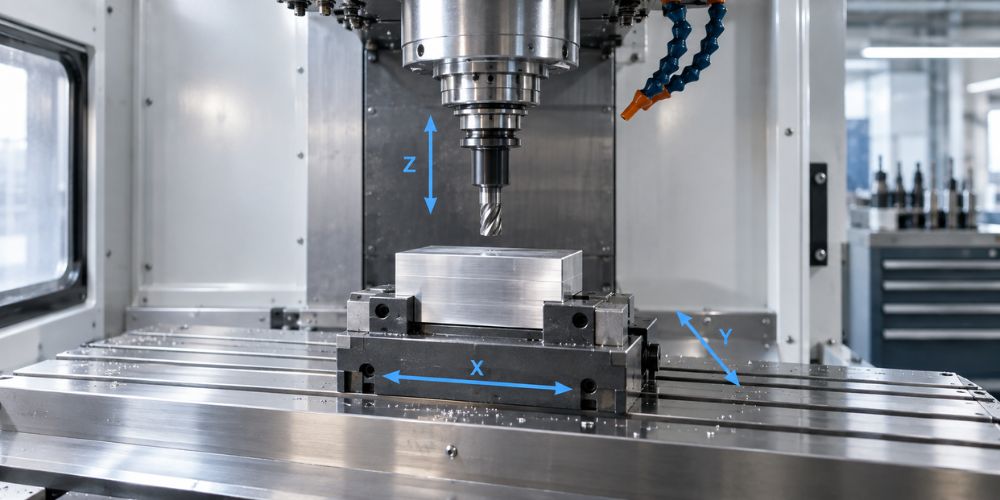
3-axis CNC milling moves the cutting tool along three linear directions: X, Y, and Z. The machine cuts left to right, front to back, and up and down.
It works well for flat surfaces, holes, slots, pockets, standard profiles, plates, brackets, panels, housings, and similar parts. Haas, for example, lists its standard VF-2 as a 3-axis vertical mill, which is a common machine format for this type of work.
2. What Is 5-Axis CNC Milling?
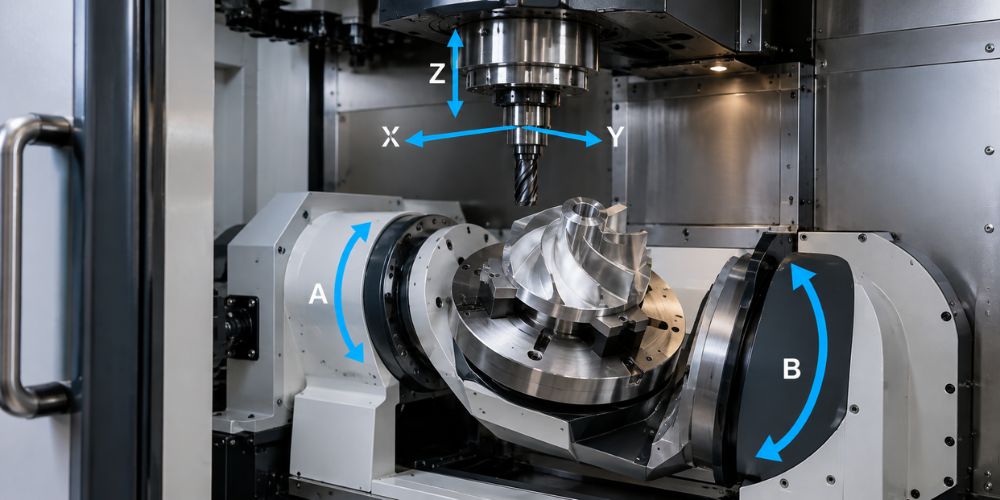
5-axis CNC milling starts with the same X, Y, and Z movement but adds two rotational axes. The tool or workpiece can tilt and rotate, allowing the cutter to approach the part from many more directions.
This makes it possible to machine complex contours, angled features, deep cavities, and several sides with fewer repositioning steps. Autodesk explains 5-axis machining as three linear axes plus two rotational axes, with both 3+2 positional machining and simultaneous 5-axis machining available depending on the application.
3. Machine Movement
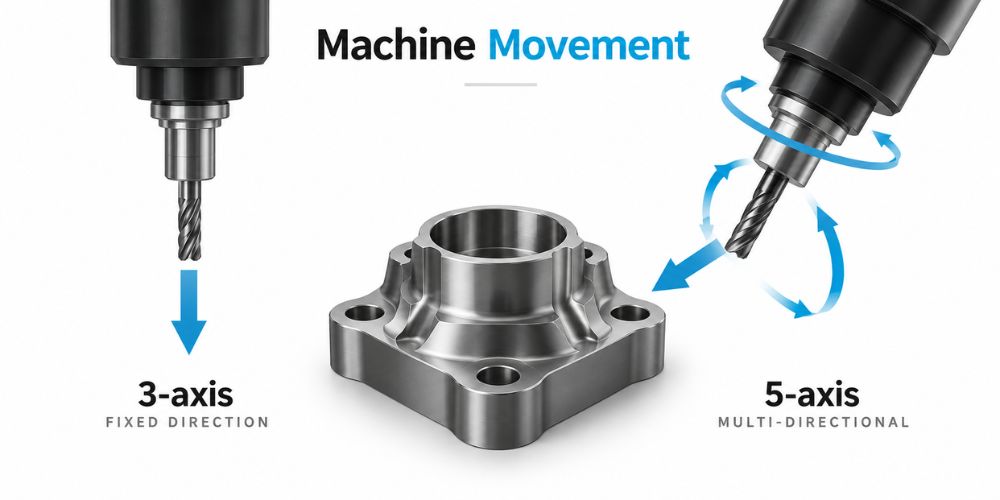
The first major difference is how the cutter reaches your part. That affects tool access, setup time, fixture requirements, and how many times someone needs to reposition the workpiece.
More movement is useful when the geometry needs it. For a simple part, however, extra axes may add little practical value.
3-Axis CNC Milling
- Three Linear Directions: The cutting tool moves along the X, Y, and Z axes. The workpiece usually remains fixed during each individual machining setup.
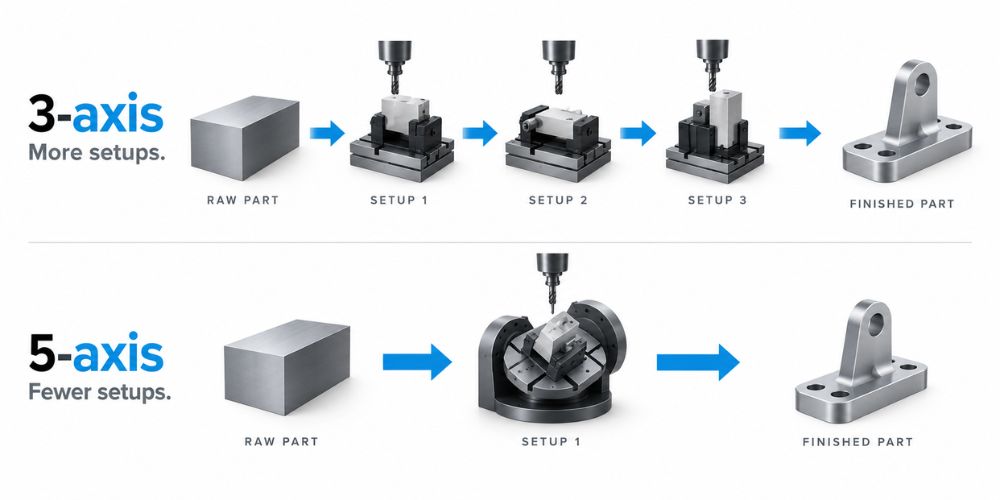
- More Part Repositioning: If several faces need machining, the operator may need to remove, rotate, locate, and clamp the workpiece again. That creates another setup and another opportunity for alignment variation.
- Simple Tool Approach: The cutter normally approaches the workpiece from a fixed orientation in each setup. This makes programming relatively straightforward for parts without difficult angled features.
5-Axis CNC Milling
- Five Directions Of Movement: Three linear axes are combined with two rotational axes. The machine can change the relationship between the cutter and workpiece while machining.
- Multi-Side Access: More faces can be reached without manually moving the workpiece. Haas specifically points to reduced setups as one of the main benefits of 5-axis milling.
- Better Tool Positioning: Changing the tool angle can help the cutter reach difficult surfaces more directly. Autodesk also notes that multi-axis machining can allow the use of shorter cutting tools, which reduces the likelihood of tool deflection.
So, do you need five axes just because they are available?
Usually, no.
At MachMaster, we review the drawing and 3D model first, then look at whether extra axis movement actually removes setups or solves a tool-access problem. Our CNC milling capabilities cover 3-axis, 4-axis, and 5-axis machining, so we can choose the route around the geometry instead of pushing every job toward the same machine.
If you already have a CAD model, you can submit the project for manufacturing review and compare the practical machining options before production.
4. Part Complexity
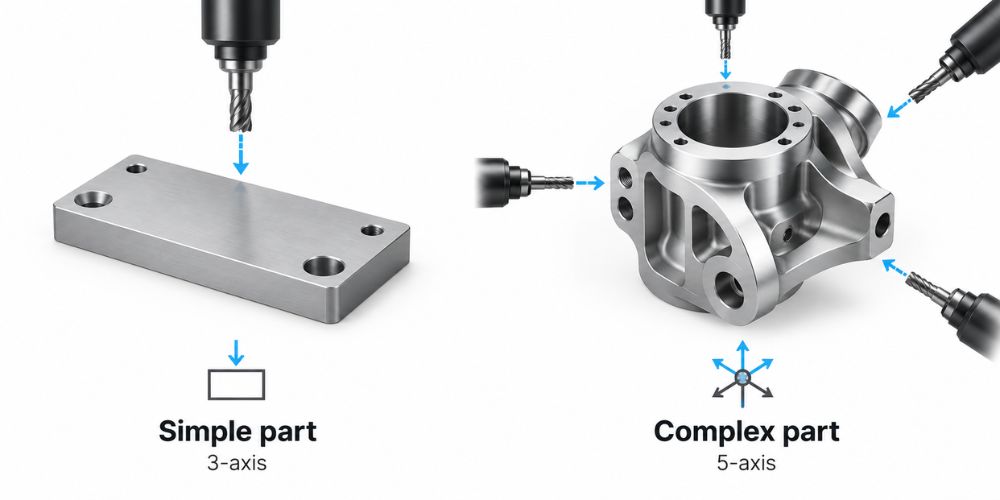
Part complexity is one of the clearest signals that separates these two processes. Angled faces, curved surfaces, deep cavities, multiple machined sides, and difficult tool access all change the decision.
But here is an important point: a complicated-looking CAD model does not automatically require 5-axis machining. What matters is whether the required features can be reached efficiently.
3-Axis CNC Milling
- Simple Geometries: Flat faces, holes, slots, pockets, shoulders, and standard profiles are well suited to 3-axis machining. The tool can reach these features from normal directions.
- Basic Multi-Side Parts: You can still machine several sides of a component on a 3-axis machine. The operator simply rotates and re-fixtures the part between operations.
- Common Mechanical Components: Brackets, covers, panels, blocks, fixtures, and many electronic housings can be handled efficiently with this approach.
Why pay for additional axis movement if the cutter can already reach everything it needs?
That is the question I often ask when reviewing a design.
5-Axis CNC Milling
- Complex Contours: Five-axis movement is useful for curved and angled surfaces that require frequent changes in cutter orientation. Autodesk cites parts such as molds and turbines as examples where simultaneous multi-axis toolpaths are useful.
- Deep Or Difficult Features: Tilting the cutter or workpiece can improve access to deep cavities and areas that would otherwise require longer tooling.
- Multiple Angled Faces: Holes, pockets, and faces located at different angles can often be machined without repeatedly removing the workpiece.
Autodesk also distinguishes between 3+2 positional machining, where the rotational axes position the workpiece and then lock, and simultaneous 5-axis machining, where all five axes can move together. That distinction matters because many multi-sided parts need positional 5-axis access without requiring continuous 5-axis motion.
In my experience, tool access often tells you more than the visual complexity of the CAD model. If every important surface can be reached efficiently on three axes, the simpler process may still be the better choice.
5. Accuracy and Surface Finish
Can a 3-axis machine produce an accurate part? Yes.
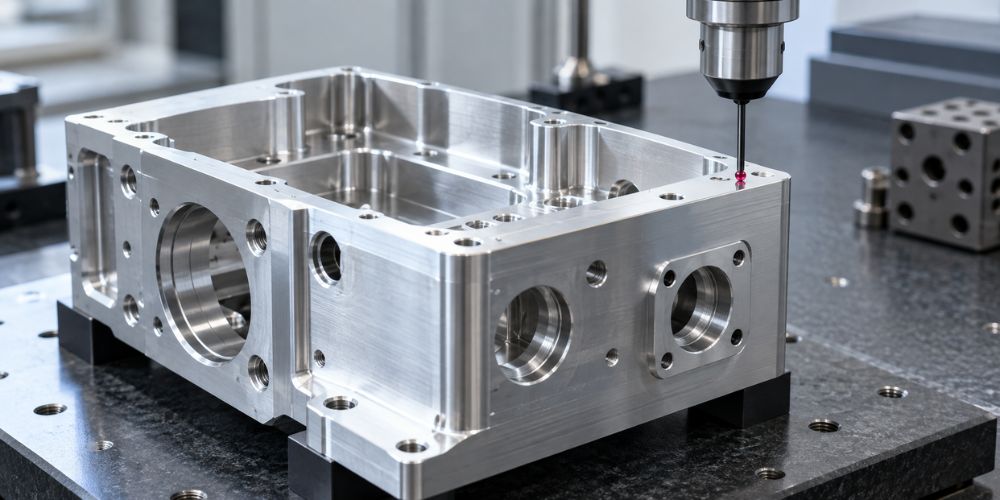
Both processes can produce precision components. The bigger difference appears when complex geometry forces repeated setups or when the cutter needs better orientation against a curved surface.
3-Axis CNC Milling
- Good Precision For Simple Parts: A properly controlled 3-axis process can produce tight tolerances. Tooling, machine condition, fixture stability, material behavior, cutting parameters, and part geometry all affect the result.
- More Setup Variables: Removing and re-clamping the workpiece introduces another locating step. If features on different faces have close positional relationships, those extra setups matter.
- Good Finish On Accessible Features: Flat faces, pockets, and ordinary contours can receive a clean machined finish with appropriate cutting tools and parameters.
Complex surfaces may require smaller tools, longer cycle times, or additional finishing passes.
5-Axis CNC Milling
- Fewer Setups: More features can often be machined while the part remains in the same clamping position. Haas states that reducing setups can help increase accuracy on multi-sided and complex components.
- Better Tool Angles: The cutter can maintain a more useful orientation against curved or angled geometry. Autodesk lists improved surface finish as a benefit because the tool can maintain better cutting angles.
- Improved Feature Relationships: If several related features are machined without removing the workpiece, there are fewer opportunities for repositioning errors between those features.
Here is why this matters.
Imagine a housing with precision holes on three different faces. A 3-axis process might require three separate orientations, while an appropriate 5-axis setup may allow those features to stay referenced from the same clamping position.
At MachMaster, we pair the machining route with DFM review and inspection based on the drawing requirements. Our CNC milling capability lists machining tolerances down to ±0.01 mm, while the final process still depends on geometry, material, feature size, and the tolerance specified on your drawing.
6. Production Speed
Which one is faster?
That question sounds simple, but spindle cutting time is only part of the answer. Programming, fixture preparation, setup changes, probing, tool changes, inspection, and actual machining time all contribute to the total lead time.
3-Axis CNC Milling
- Fast Setup For Simple Work: Basic parts can often be programmed and prepared quickly. For straightforward prototypes, this can make 3-axis machining very efficient.
- Efficient Standard Toolpaths: Holes, faces, pockets, and ordinary profiles do not need advanced multi-axis motion. Adding more axes would not automatically shorten the job.
- More Handling For Multi-Side Parts: If four or five sides must be machined, operators may spend extra time rotating, locating, and clamping the workpiece.
Those minutes add up across a production batch.
5-Axis CNC Milling
- Fewer Setup Changes: More sides can be reached without removing the workpiece. Haas states that simultaneous 5-axis machining can reduce operations, setups, and cycle time for suitable parts.
- More Work Per Setup: Angled holes, side features, contours, and other geometry can often be completed from one fixture arrangement.
- More Programming Work: Multi-axis CAM requires closer planning of tool orientation, machine movement, clearance, and collision risk. Autodesk’s Fusion documentation includes multi-axis tool controls and automatic tool tilting for collision avoidance, which shows why programming is more involved than a basic 3-axis path.
So, which process wins at speed?
For a simple bracket, probably 3-axis. For a complex part needing four manual orientations, the answer may change.
I have seen buyers focus entirely on cutting time and overlook the setup work surrounding it. The better comparison is total production time per finished part.
If lead time is driving your decision, send your CAD file and quantity so the full manufacturing sequence can be considered rather than the machine cycle alone.
7. Cost Comparison
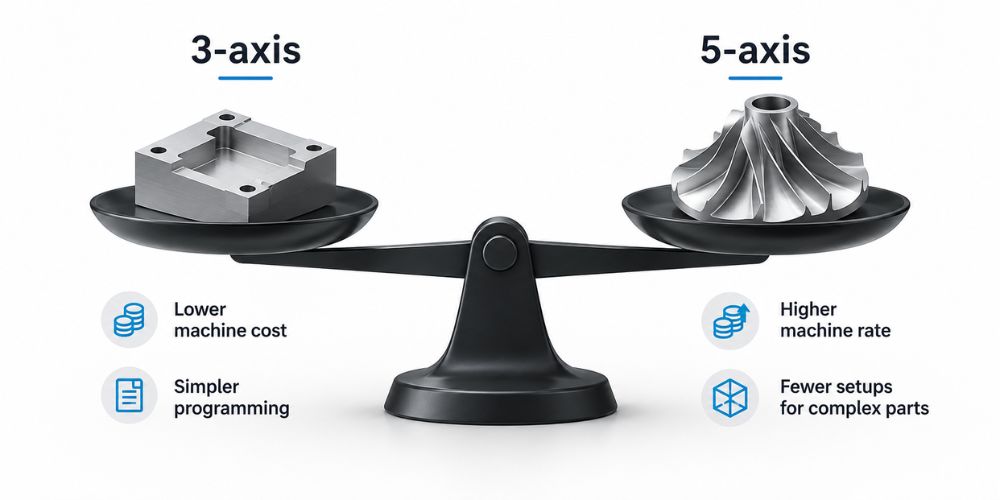
3-axis machining normally begins with a cost advantage because the equipment and programming are less complex. But that is not the same as saying a 3-axis process always produces the lowest final part price.
Here is why this matters: the cheapest machine hour is not always the cheapest manufacturing route.
3-Axis CNC Milling
- Lower Equipment Cost: Standard 3-axis machining centers generally cost less than comparable 5-axis equipment.
- Simpler Programming: Standard holes, pockets, profiles, and faces need less multi-axis CAM planning.
- Possible Fixture And Setup Costs: A complicated component may require several fixtures and manual repositioning operations. Those extra steps add labor and time.
5-Axis CNC Milling
- Higher Machine Investment: Five-axis equipment has more mechanical and control complexity, which is reflected in machine pricing.
- Fewer Fixtures And Setups: A higher machine rate may be offset if several separate operations can be combined into one setup.
- Potentially Better Economics For Complex Parts: The more orientations a 3-axis process requires, the more valuable setup reduction can become.
Real Machine Price Example
The figures below are machine purchase prices, not CNC service prices or per-part quotes. They simply show why 5-axis machine time often carries a higher cost base.
| Example Machine | Axis Configuration | Published Starting Price* | What It Shows |
| Haas VF-2 | 3 axis | US$70,995 | Standard 3-axis equipment starts at a lower capital cost |
| Haas UMC-500 | 5 axis | US$156,995 | Integrated 5-axis equipment carries substantially higher machine investment |
*Haas published U.S. starting prices viewed in August 2026. Machine pricing, discounts, options, taxes, installation, and regional pricing can change. Check the current Haas VF Series pricing and UMC-500 pricing for current figures.
Does that mean your 5-axis part will cost twice as much?
No. Machine purchase price and part price are different things.
A 5-axis machine may cost more to own and run, but a complex component could require fewer fixtures, fewer setups, and less operator handling. Haas and Autodesk both identify setup reduction as a major benefit of multi-axis machining.
At MachMaster, we compare the geometry, tolerance, and machining sequence before choosing between the processes. Our goal is to look at the finished-part cost, rather than simply assigning the job to the machine with the lowest hourly rate.
For a useful cost comparison, upload your CAD drawings for review. A quote based on the actual geometry, material, quantity, tolerance, and finish tells you much more than a generic 3-axis versus 5-axis price estimate.
8. How to Choose Between 3-Axis and 5-Axis CNC Milling
You do not need to choose based on machine specifications alone. Start with your part, then work outward to tolerance, setup count, quantity, production time, and total cost.
A good rule is simple: use the least complicated process that can produce the part correctly and economically.
Check Your Part Geometry
How many surfaces actually need machining?
Simple plates, brackets, housings, blocks, and similar parts are often strong candidates for 3-axis milling. If the cutter can reach all important features through a few straightforward setups, adding two more axes may provide little benefit.
Complex contours, angled holes, deep cavities, undercuts, and multi-sided features can change the calculation. Autodesk’s 5-axis guidance specifically identifies complex shapes, deep cavities, and intricate features as areas where multi-axis movement can help.
Review Tolerances And Setup Requirements
Next, ask whether features on different faces have close positional relationships.
If a 3-axis process requires repeated repositioning, each new setup requires the workpiece to be located again. Fewer setups can reduce the opportunity for setup-related variation, which is why both Haas and Autodesk connect multi-axis machining with improved accuracy on suitable complex parts.
That does not mean a 5-axis machine is automatically more accurate for every component.
For a simple part completed in one stable 3-axis setup, additional rotary axes may offer no accuracy advantage at all.
Compare Total Cost And Production Quantity
For simple prototypes and common components, 3-axis machining can offer the lower-cost route.
For a complex component, the higher machine rate of 5-axis machining can sometimes be balanced by fewer fixtures, fewer setups, less manual handling, and shorter overall production time.
Quantity matters too.
A custom fixture may feel expensive for one prototype but become relatively small on a run of thousands. On the other hand, reducing several manual setups across hundreds of complex parts can have a much larger effect on production cost.
Before choosing, compare these four points:
- Can the tool reach every required feature?
- How many setups will each process require?
- What tolerances and surface requirements are specified?
- What is the total finished-part cost at your required quantity?
That gives you a much better answer than simply asking, “Is 5-axis better?”
Conclusion
Choose 3-axis CNC milling for simpler parts with accessible features and lower setup needs. Choose 5-axis CNC milling when your part has complex angles, curved surfaces, or several sides that need machining.
The best choice depends on your geometry, tolerance, quantity, and total production cost. A more advanced machine is useful only when it solves a real manufacturing problem.
At MachMaster, we review your drawing and recommend a practical CNC machining route based on the part itself. Upload your CAD file and project details to get a manufacturing review and quote for your project.
Explore More of Our Resources
Want to see more products? We’ve got plenty of options that might just be the perfect fit for you:
We’ve gathered a few more articles that could help you out. Check them out for more great advice:
- 10 Leading Metal CNC Machining Manufacturers for Custom Industrial Components
- CNC Turning: A Complete Manufacturing Guide for Engineering Teams
Still haven’t found what you’re looking for? Don’t hesitate to contact us. We’re available around the clock to assist you.