
I run a metal fabrication shop. A client once asked me to help build a custom keyboard frame for a product launch. I didn’t expect it to be that hard.
That request taught me something. Every part of a keyboard, shell, size, and inside matters more than I thought.
You can trust what I’m sharing here. I’ve built physical parts for businesses for over a decade. I don’t just write about materials; I work with them every day.
In this article, you’ll learn:
- What shell materials affect, and how they change cost and feel
- Why keyboard size matters for space, typing, and use
- How internal structure changes function and user comfort
So let’s get started!
1. What Is a Keyboard Shell
I remember the first time I handled a bare keyboard frame in my shop.
It looked like just a piece of aluminum. Clean cuts. No frills. But the more I worked on it, the more I saw how much it mattered. The shell wasn’t just a casing, it was the first thing a user touched, saw, and judged.
If you’re building something that needs to feel right in both form and function, you can’t treat this part as an afterthought.
Definition
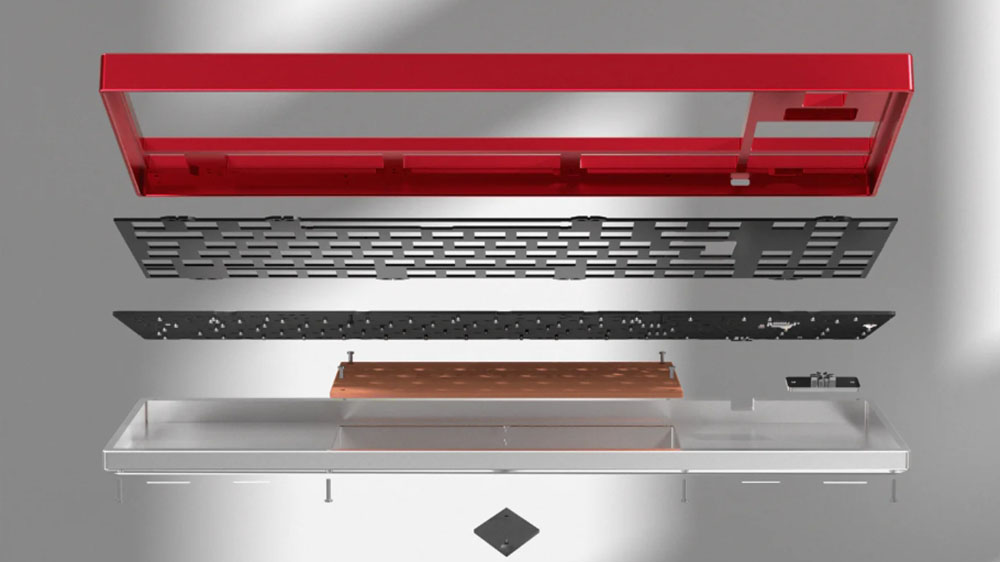
The keyboard shell is the outer casing. It’s the hard frame that surrounds and supports the keyboard’s key switches, circuit board, and other parts.
You can think of it like the body of a car. It shapes the whole thing, covers the internal structure, and gives a base for everything else to fit into.
The shell includes the top and bottom covers. Sometimes, it has extra layers like a plate or a weight for balance. It can be made from metal, plastic, or other materials.
Function
The shell does more than hold parts together. It directly affects how your product performs, feels, and lasts. Here’s how:
- Protection: Shields the circuit board and switches from dust, spills, and impact. This lowers the risk of product failures.
- Feel: Add weight and structure. A solid shell feels stable. A light one may flex or rattle under pressure.
- Sound: Changes the sound when typing. Dense materials make it quieter. Hollow ones sound sharper.
- Look: Gives shape and style. The form, finish, and edges help express your brand’s identity.
- Cost: Affects production time, machining steps, and shipping weight. These details hit your budget, especially in large runs.
2. Common Materials Used in Shells
The material you choose for a keyboard shell affects more than how it looks. It plays a role in how the keyboard feels, sounds, lasts, and how it’s perceived in the market.
I’ve worked with most of these materials in my own shop. Some machine clean. Others fight back. But each one brings something different to the table.
If you’re picking a shell for production, design, or personal use, here’s what you need to know:
Plastic (ABS, Polycarbonate)
Plastic is common in mass-market keyboards. It’s light and easy to mold.
- Cost: Low. Great for tight budgets or high-volume runs.
- Tactile Aesthetics: Smooth, sometimes glossy. Can feel hollow or soft.
- Acoustic Properties: Tends to be louder and more “clacky.” Less dampening.
- Market Position: Entry-level to mid-range. Often seen in office or school setups.
Good for: large batch production, functional builds, cost-focused products.
Aluminum
This is what many brands use to show higher quality. I’ve machined aluminum for small and mid-size batches. Clean edges. Solid feel.
- Cost: Medium to high. Requires more processing and finishing work.
- Tactile Aesthetics: Cool to the touch. Sturdy and smooth. Looks sharp.
- Acoustic Properties: Softer sound than plastic. More muted typing.
- Market Position: Mid to high-end. Fits both consumer and professional builds.
Good for designers who want a premium finish without overpricing.
Steel
Heavier than aluminum. Tougher too. I’ve used steel when durability mattered most, but it needs more handling and care in the shop.
- Cost: High. Harder to machine. Slower to work with.
- Tactile Aesthetics: Cold and weighty. Very solid. Less common in day-to-day use.
- Acoustic Properties: Can sound deeper, heavier. Sometimes adds echo.
- Market Position: Niche or industrial. Not widely used in mainstream keyboards.
Good for: specialty builds, or where strength matters more than comfort.
Acrylic
Clear or frosted, acrylic shows off lighting well. I’ve built with it for RGB-heavy designs. It’s easy to cut, but scratches fast.
- Cost: Moderate. Easy to source and shape, but not as strong.
- Tactile Aesthetics: Smooth, glass-like. Comes in clear or colors.
- Acoustic Properties: Crisp, sharp typing sound. Not much dampening.
- Market Position: Visual appeal. Often used in enthusiast or showcase builds.
Good for: RGB-focused keyboards, visual brands, short-term builds.
Wood or Resin
These feel personal. They’re hard to batch, though. I’ve done a few resin molds, they take time, and no two come out exactly alike.
- Cost: Varies. Labor-intensive. Not ideal for scaling.
- Tactile Aesthetics: Natural grain or swirled finish. Each piece feels different.
- Acoustic Properties: Softer and warmer. Dulls harsh sounds.
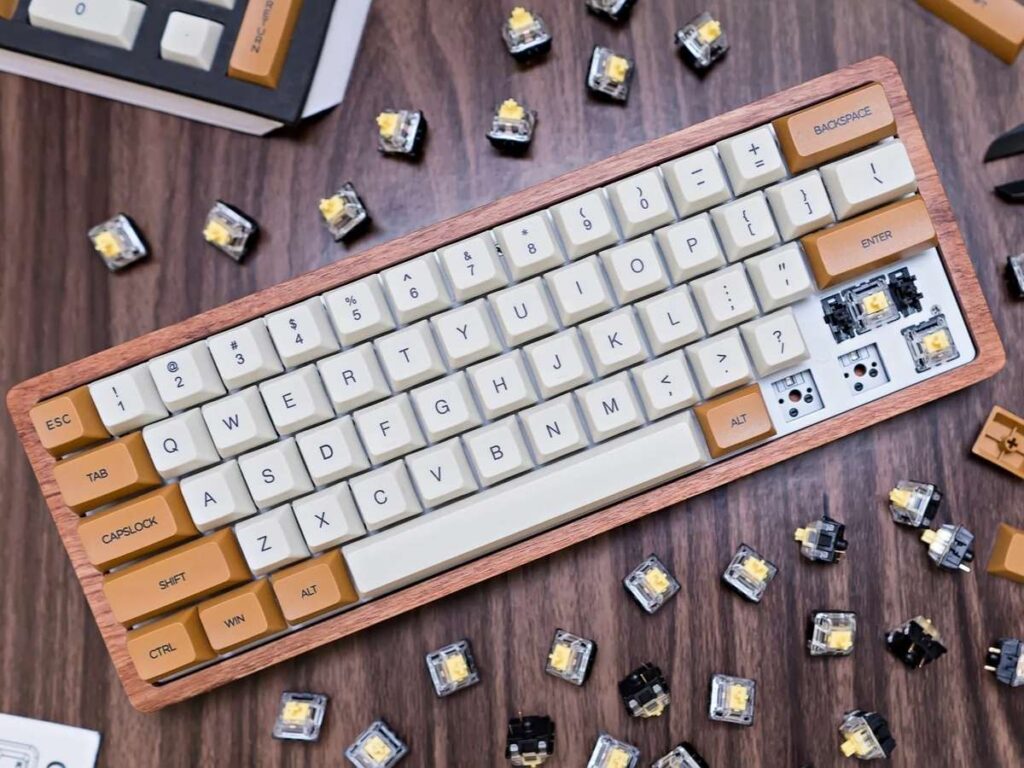
- Market Position: Artisan, one-off, or limited runs.
Good for: boutique brands, collectors, or special editions.
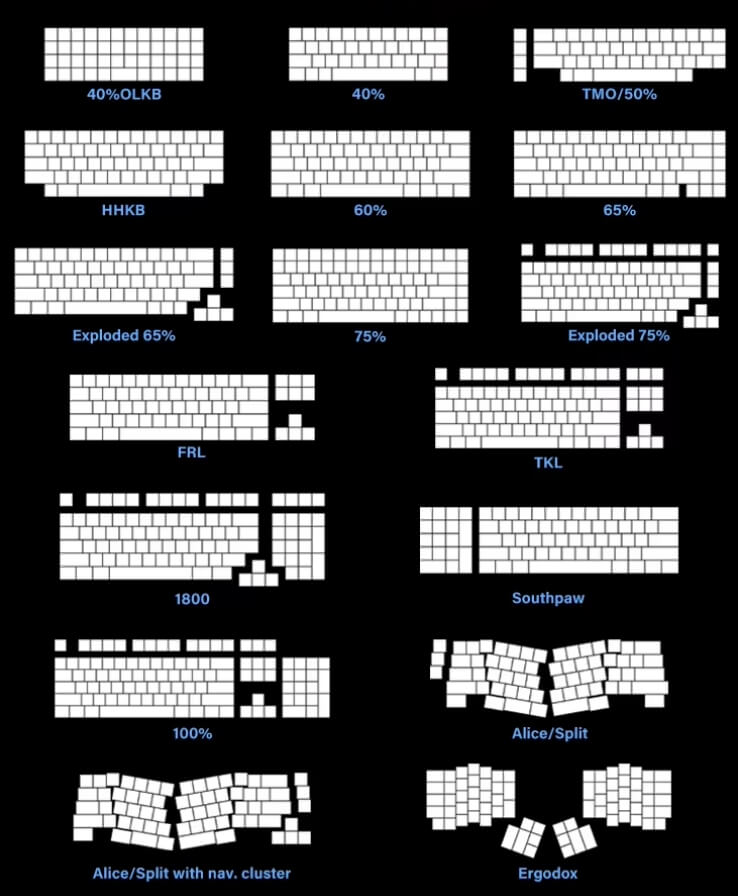
3. Common Keyboard Sizes and Their Use Cases
Keyboard size affects more than just looks. It shapes how people work, how much space they need, and how fast they move.
I’ve worked with clients who chose full-size boards for data entry, and others who went ultra-compact to fit small workstations. There’s no one-size-fits-all. That’s why we at MachMaster often build around specific team needs, whether for factories, design labs, or mobile setups.
Below is a breakdown of common sizes and what they’re best used for:
100% / Full-Size (104 Keys)
This layout includes everything: number pad, function row, arrows, and navigation cluster.
- Use Case: Best for offices, data-heavy roles, and general business tasks.
- Why Choose It: Full key access. No trade-offs.
- Downside: Takes up more desk space.
If your team does accounting or admin work, this layout delivers without compromise.
TKL / Tenkeyless (87 Keys)
No number pad, but all other standard keys are present.
- Use Case: Popular in design firms, development teams, and tight desk setups.
- Why Choose It: Saves space. Keeps arrow keys and function row.
- Downside: May not suit users who rely on numeric input.
A safe middle ground for business users who need room for a mouse or tools.
75%, 65%, 60% Layouts
These sizes trim down the keyboard by removing or compressing lesser-used keys.
- Use Case: Gaining traction with product designers and personal buyers.
- Why Choose It: Saves space without losing main keys.
- Downside: May take time to adjust. Key placement changes.
40%, Macro Pads, Split Layouts
This group fits into a more advanced or niche category.
- Use Case: Ergonomics, travel, or specialized input tasks.
- Why Choose It: Lightweight. Custom key mapping. Split options for posture.
- Downside: Steeper learning curve. Often needs software setup.
Great for personal builds, travel setups, or teams with specific workflow needs.
4. Keyboard Mounting Styles
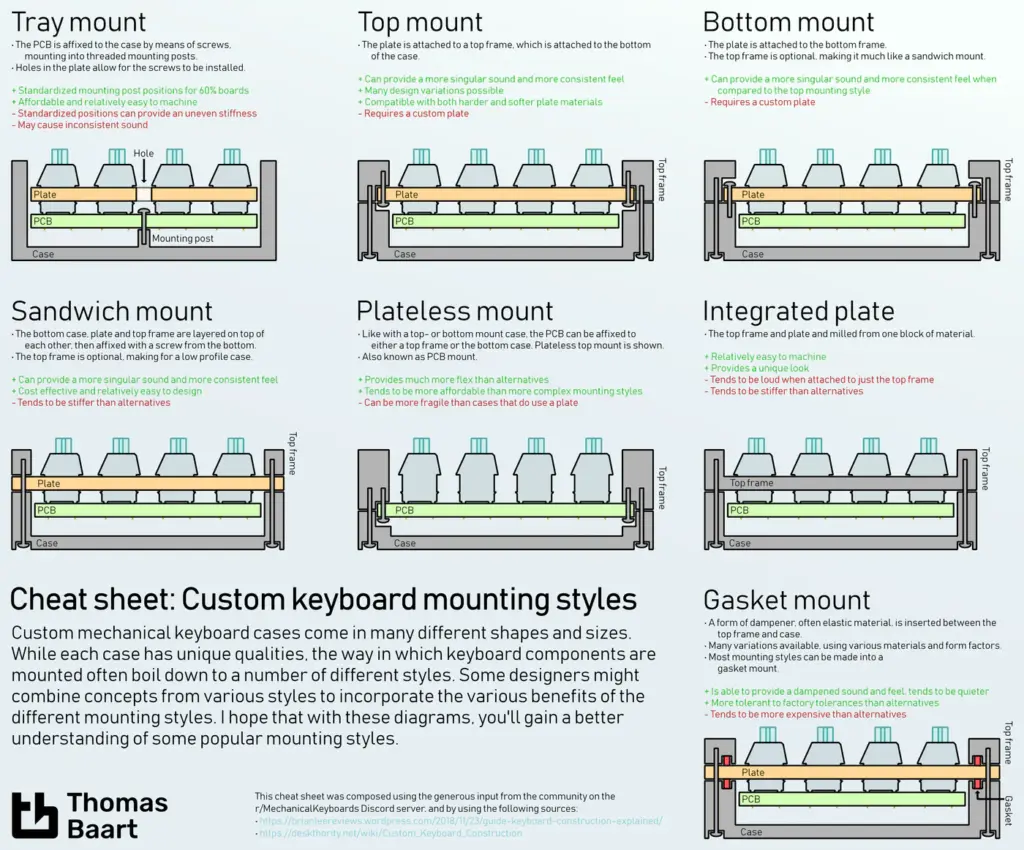
Mounting style shapes how the keyboard feels when you type.
It’s not always obvious. But if you’ve ever pressed a key and thought, “This feels sharp” or “This is soft” chances are, that came from how the internal parts are mounted.
At MachMaster, we’ve built boards across every mounting style. For some clients, a simple tray mount makes sense for cost. Others want the softer, dampened feel of gasket mounts for long hours of use.
Here’s what each mounting type offers:
Tray Mount
The plate is screwed directly into the case tray from the bottom.
- Feel: Firm and slightly uneven, depending on where the screws are placed.
- Build: Simple and affordable. Easy to assemble.
- Use Case: Budget builds, early-stage product runs.
Good for mass production when the focus is on function over typing feel.
Top Mount
The plate attaches to the top half of the case.
- Feel: More consistent across the board. Slightly stiffer than other types.
- Build: Secure. Reduces case flex.
- Use Case: Mid to high-end builds, office work, or user-facing products.
Gasket Mount
The plate sits between soft gaskets. It’s suspended without direct contact with the shell.
- Feel: Soft, quiet, and flexible. Dampens sound and vibration.
- Build: More parts and prep needed.
- Use Case: Premium builds, long sessions, sound-sensitive environments.
Bottom Mount / Integrated Mount
The plate is built into the case, or it’s mounted from the base only.
- Feel: Varies. Compact, with less bounce.
- Build: Works well for custom layouts or unique formats.
- Use Case: 40%, travel keyboards, and highly compact builds.
5. Layout Customization
Layout isn’t just about where the keys go. It’s about how people work, what they need close by, what they never use, and how fast they want to move.
I’ve worked with teams who needed just the basics. Others needed macro rows, split spacebars, or full international keys.
If you’re planning a keyboard for your team or product, layout is where small changes can make a big difference.
Overview
Layout customization means adjusting the keyboard’s key arrangement. This includes:
- How many keys are on the board
- Where each key sits
- What each key does
It also includes non-standard choices like split spacebars, stepped caps lock, or ISO vs ANSI formats.
These changes aren’t just cosmetic, they affect typing speed, muscle memory, and long-term comfort.
Importance
For business use, layout choices should match how people work. Here’s how it plays out:
- Data teams may need a number pad always within reach
- Designers might want function keys remapped for shortcuts
- Operators may prefer bigger escape or enter keys for fast use
- International teams often need different language support
The wrong layout leads to missed keystrokes, slower work, and frustration. The right one speeds things up and reduces strain.
Fixed vs Flexible Layouts
Some layouts are fixed, what you see is what you get. Others allow key remapping or swappable switches.
If you’re buying or producing in bulk, you’ll need to decide how much flexibility to give your users.
- Fixed Layouts: Simpler, cheaper, consistent
- Flexible Layouts: More adaptable, higher setup time, better for tech-savvy users
6. Mass Customization vs. Artisan Builds
When it comes to custom keyboards, you have two main paths.
One is mass customization, which is scalable, structured, and consistent. The other is artisan builds, personal, slow, and often one of a kind.
Some clients need high-volume runs with precise specs. Others ask us to build a few standout pieces for brand showcases or executive desks.
Both paths serve a purpose. The key is knowing which one fits your needs.
| Feature | Mass Customization | Artisan Builds |
| Volume | Dozens to thousands of units | One-off to small batches (1–10 units) |
| Lead Time | Shorter, predictable | Longer, varies by material and method |
| Design Consistency | High. Uniform results with tight tolerances | Low. Each unit may have small differences |
| Cost per Unit | Lower with scale | Higher due to manual labor and setup |
| Material Options | Limited to what works well in bulk | Wide, including rare or experimental materials |
| Customization Scope | Standardized options with some variation | Fully open to client direction |
| Target Audience | Companies, teams, product lines | Collectors, executive gifts, limited-edition runs |
| Brand Positioning | Practical, scalable, cost-aware | Premium, exclusive, craft-oriented |
| Maintenance & Support | Easier to replace or repair parts | May need maker involvement for fixes |
If you’re building a product line, outfitting a team, or managing costs, mass customization is likely the better fit.
If you’re building for high-visibility use, limited launches, or premium buyers, artisan builds offer more freedom and personal value.
We’ve seen clients use both: mass builds for their team, and one artisan piece for a company founder. The right path depends on your goals, your timeline, and your audience.
7. Factors to Consider When Customizing a Keyboard
Customizing a keyboard isn’t just about picking what looks good.
It’s about building something that fits real use. Whether you’re sourcing for a team, developing a product, or making a tool for daily work, each choice should serve a purpose.
Use Case
Start by asking: who will use the keyboard, and how?
- Office teams may need full-size layouts for number entry
- Designers may want compact builds for more mouse space
- Travel setups may need lightweight shells with flexible layouts
Use comes first. Form should follow.
Typing Feel
This is shaped by a mix of materials, mounting style, and switches.
- Want a firm press? Use metal plates and top mounts
- Want something softer? Try gasket mounts with dampened shells
- For long typing sessions, balanced feedback can reduce fatigue
Test if you can. The difference is clear once you feel it.
Material and Finish
We covered this earlier, but it’s worth repeating here.
- Aluminum looks premium, feels sturdy
- Acrylic glows well for RGB setups
- Plastic works for scale but feels different in hand
Finish also matters. Matte, glossy, textured, they all send a message.
Layout and Key Mapping
Make sure the layout fits the software and habits of your users.
- Do they use shortcuts?
- Need special keys for tools?
- Will users remap keys or expect plug-and-play?
A well-planned layout saves support time later.
Conclusion
That first aluminum frame I built? It taught me everything you just read.
Shells, sizes, and layouts all matter. Your choices affect feel, sound, cost, and brand value. You don’t need to know everything. You just need to ask the right questions.
What do your users need? How will they use the keyboard?
Machmaster helps makers like you move from idea to execution, fast and right.
Start building today. The faster you start, the quicker you’ll learn.
Let’s make it work. Contact us today.